Showing posts with label free resources. Show all posts

Monday, March 24

20 Awesome iPad Apps for Primary (K-12)

The best apps for learning and teaching are likely to be those recommended by other teachers, and learners. Today's list comes from TCEA (A Texas association of teachers helping to encourage good uses for technology in the classroom). They have collated their best, mostly free iPad apps for a range of different ages / stages / approaches:

Here are their top recommendations. And there are a lot more than 20!

The shaded ones are free. Use the top links to filter down to different types of apps. Full screen version here

This sheet, and all the info within it provided by the team at TCEA

Thursday, October 24

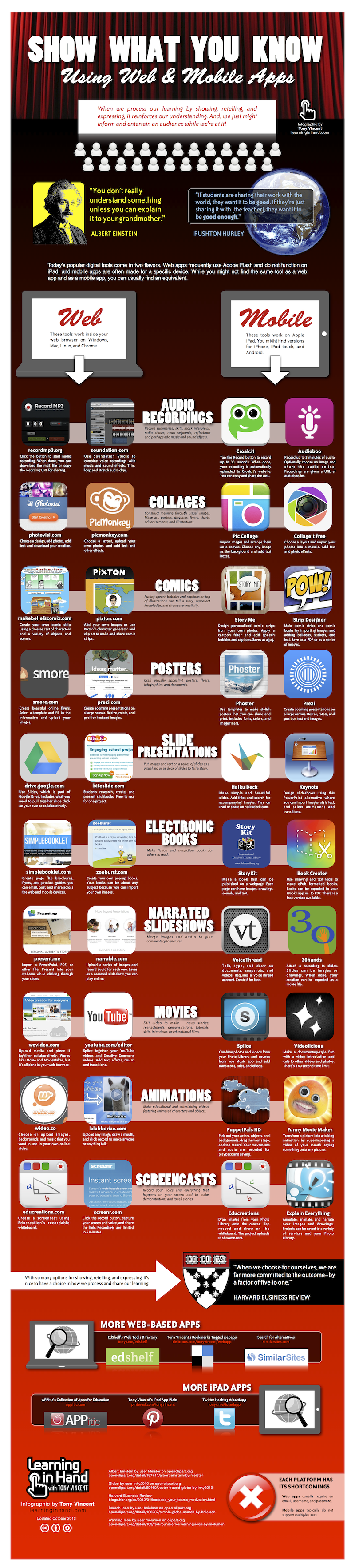
Top mobile apps for presenting

We all know that mobile can be very effective in a classroom as a tool to "do stuff". Here is a fantastic round up of all the best apps, and websites that your students can use to record, show and tell what they have done.
Even if you think you know it all - I guarantee you'll get a few new ideas by the time you finish reading this infographic!


How are you planning on using this?
Thanks to Tony Vincent at learninginhand for the excellent round up!

Thursday, July 25

Wikipedia Zero launches in India!

Wikipedia Zero - an ambitious project aiming to bring free access to Wikipedia to all developing countries - has signed it's first deal in India.

Wikipedia zero

This is great news for the 60 million subscribers of Aircel (India's 7th largest network provider), who now get free access to all wikipedia information via the Wikipedia Zero. This is also great news for the developing world at large. The more popular demand for this, the more local operators will take heed, and offer this free data access to their subscribers.

This brings the number of people with free access to over half a billion! If you are in one of the following 17 countries (and using the right network), you won't need to pay any data rates to access all the knowledge in Wikipedia:

Uganda, Tunisia, Malaysia, Niger, Kenya, Montenegro, Cameroon, Ivory Coast, Thailand, Saudi Arabia, Democratic Republic of Congo, Botswana, Russia, Indonesia, Pakistan, Sri Lanka, India

Wikipedia Zero works in the same way as Facebook Zero, offering a minimal (low data) version of their site to specific operators, and covering the data costs themselves. Users can browse on that specific URL, without paying any data charges.

Users can access Wikipedia at zero.wikipedia.org and  m.wikipedia.org - but if you are browsing from a different network, you won't get it free (in the case of "zero", you might not even see it!)

We haven't been able to test the difference is between the "m" and the "zero" sites, but believe that "zero" has no images at all, and is even faster, with a more minimalist design to perform better on low end devices and slow connections.

It is not really possible to estimate the impact of sharing free knowledge with hard to reach areas in the world without getting all misty eyed and coming up with bland generalisations, so I'd rather like to point you to one small story from a shanty town just outside Cape Town, South Afrtica:

The view outside Sinenjongo High School, Joe Slovo Park, Cape Town, South Africa-3438

Sinenjongo High School is made of old shipping containers, in a township of very poor dwellings, populated by people who really do not have very much going for them, apart from their own energy, and initiative

Staff and kids at the school heard about Wikipedia Zero - which is NOT currently available to them, and set up a petition to the local network providers to sign up.

This made the local press, which caught the eye of the South African wikipedia team, who passed on the message to their global team.

This in turn, helped generate huge online interest. See this fantastic blog post from from Victor Grigas, a wikipedian who was so inspired he made his first trip to Africa to meet the school

The story isn't over yet. South Africa doesn't have Wikipedia Zero. (nor do many other needy countries), but the more voices that are heard, the closer we will get to freedom of information, and rights to knowledge!


Spread the word

Friday, July 5

Core Apps for iPad Teachers

Are you a teacher, using iPads in the classroom? Which tools, or apps do you use?
Many conversations about mobile learning focus too much on the content itself. Starting from the distance learning / e-learning / content publishing end of the spectrum, and trying to find entire chunks of the curriculum that can be delivered via small screens.
To counteract that, have a look at this great summary of "Core Teacher Apps", put together by an Australian Primary School.
They are using iPads, but many of the listed apps are web based. Or are also available for Android. And in almost all cases, the apps themselves are secondary to the use cases implied.
I suggest you print this out, and use the list as a reminder:
  • new to m-learning? Look through these, and think what you might use them for in a classroom
  • an m-learning veteran? Look through this list to find some inspiration. Anything you haven't tried before? Why not?

Friday, April 26

Top trends in Learning Technologies: a bluffer's guide

Do you know your MOOCs from your OERs?
Are you BYOD while flipping the classroom?
Have a look at our quick guide to the top trends in Learning Technology. What they are. What they mean. And how to see through the hype enough to be able to talk confidently about them!


OER - Open Educational Resources:
OER Image
Historically, there has been an uncomfortable relationship between publishers, and educators. Who owns the rights to the content used during teaching? How much gets paid for the books and resources? Is that profit going to improved content, or happy shareholders.
Enter the OER movement. Open educational resources that an be used, modified and shared, for free. Momentum seems to be moving faster in some countries than others, but many heavyweight backers, funders and institutions are starting to put their money, and weight behind the idea that educational resources should be made available, for free.
It is still a fairly disconnected movement, with many different stakeholders, and many different definitions of "free" and "open". But a huge range of very good resources, and publications have already been freed up, and in some admirable cases teams of educators are working together to write their own, collaborative text books as open alternatives to commercial ones.
Special mention here should go to Creative Commons, who offer a very simple licensing model, to help users understand exactly how free, or open some reused content is.
Verdict: OER is very significant. If you are using government funding to generate new resources, think seriously about making them available to all.

Mobile Learning:
vuforiaMuch hyped, only moderately understood. Mobile learning is a term used when mobile devices are woven into a learning, or training scenario. Often, but not always where the learner themselves is mobile. It has found some significant success in areas where traditional training, or learning are not working that well (hard to reach learners, travelling employees) as well as triggering a rethink about traditional e-learning modules - since mobile is great for instantaneous lookup, and small snack-based learning, but a poor tool for a drawn out e-learning course.
The most important thing to bear in mind is that it isn't one things. It is a toolbox of approaches that you pick from as needed. So conversations about mobile learning "at school", are likely to be massively different from "at university", and different again from "at work".
My team have been dedicated to this niche for quite a few years - if you want to dig deeper, look around the site!
Verdict: m-learning is already making huge impact in niche areas. and will continue to do so - but don't assume it replaces face-to-face experience. Think of it more as an enricher / enhancer, and be suspicious of vendors promoting shiny equipment, or mega complex systems. Make sure they are supporting real learning.

Game based learning:
games
This has been described as the "next big thing" for at least the past 10 years. Two disastrous models, often repeated are:
  1. interesting game, often of first-person adventurer / puzzle solving variety, with really naff 2-d content quizzes scattered through it. A fun game ruined by lame learning.
  2. linear e-learning style content course, with series of quizzes and knowledge tests that have been built up into a contest / competition format. But the "game" is just proving your content knowledge
(I may be being a little cruel - since there are some examples of the latter working well, where drill and practise is useful. Like language learning. Or maths skills)
Two interesting, and more successful models are:
  1. playing a real game, designed for entertainment, but setting challenges within it that build on learning. (Tym Rylands has been doing this for years, with Myst)
  2. doing real, learning tasks. But using a badging system to show progress, and gains. (Mozilla's Open Badges framework offer goodtools for this)
Verdict: Mixing play with learning has always been effective, and will continue to be so. But rubbish-quality resources don't magically improve by adding a quiz at the end, a leader board, and some badges. Make sure the learning is right, before diving into a large, complex system

Learning Analytics:
This is Big Data for learning. Using data management tools to pull in multiple sources of information about your learners, and then using that to understand, in greater depth, what their needs are. Why just look at data from the LMS, when you can also find out about sickness records, library access, unpaid fines, club memberships and even what they eat at the canteen!
This can work. But you need seriously advanced data skills not to be misled, and robust data ethics in place not  abuse what you know.
Verdict: Very powerful possibilities. Both for supporting learners in new, and meaningful ways. And for abusing what you know about them. Resist the urge to exclude failing learners rather than investing in them. Definitely worth engaging with - but keep a firm grip on the ethics :-)

MOOC - the Massively Open Online Course:
mooc
MOOCs are learning websites - often free - designed to offer learning to many thousands of students at the same time. They have been around for quite a few years, but suddenly hit the big-time, thanks to recent backing from some big universities, and some high profile start-ups. But the hype is also slightly skewed to one specific genre of MOOC.
Why the hype: Several big universities have started offering free access to their course materials. This is extremely cool (since a poor student at an under-resourced school can now access the same content as a MIT graduate), but has caused all sorts of uncomfortable knock on effects. Can the poor student now get a degree from MIT? Is the distance experience of an equivalent quality to a residential student? Should they pay?
Unfortunately these debates have entirely skewed the public perceptions about MOOCs. They are NOT just a vehicle to distribute pre-recorded lectures. Many of the most inspired MOOCs are not modelled on a traditional lecture / classroom based experience at all, but rather built on learner centered, connectivist ideas, where the students work.
To try to distinguish between these, one of the founders of the MOOC movement has suggested renaming them xMOOC and cMOOC - with xMOOCs being the ones modelled on a traditional lecture based experience (handing over the knowledge) and cMOOCs being the collaborative ones, where learners work together to generate the knowledge.
High profile examples of xMOOCs include:
  • FutureLearn - launched by Open University in UK
  • Coursera – spun out of Stanford
  • edX – spun out of harvard & MIT
  • udacity – originated with a stanford Artificial Intelligence course.
Or examples that break away from formal university courses, but use a similar model:
  • Peer-to-Peer University (P2PU)
  • Udemy
cMOOCs would include:
  • MobiMOOC - annual event focussed on mobile learning
I suggest we add one more type: domainMOOCs. MOOCs designed for individual access to teach a specific subject. Or to make the content available for free, to be used in other platforms
  • CodeAcademy - building software programs. Dynamic marking and guidance
  • Khan Academy - custom paths through maths learning modules
  • Open Study
  • MIT OpenCourseware
  • Ted-ed – not quite the same, but TED's own open learning initiative
And if this all feels like too much - there are even sites trying to offer indexes to all of these courses: www.class-central.com
Verdict: Are making an important impact on open, shared learning. But if you get cornered by a university lecturer with strong opinions about MOOCs destroying higher education, bear in mind that he may have his head stuck in one specific debate (xMOOC vs traditional university degree) and be missing the big picture. And the real gains!

Flipped Classrooms:
If so much information is available online, and quality time with your teacher is hard to find … why waste the time you DO have together by sitting quietly in your chair, and listening to a lecture. Far better, perhaps, to watch the lecture recorded before you come into class, and then spend the face-to-face time discussing it, asking questions, doing activities. This is the idea behind the flipped classroom, and it has some great success stories around it
verdict: Simple, yet effective reminder that face-to-face time is valuable, and ought to be used to help understanding, rather than just broadcast the facts

BYOD
Bring Your Own Devices refers to initiatives to allow students / employees to use their own, personal devices at work, or at school, as an official part of their day. There are a wide range of views about this, though in most scenarios it is a useful and empowering approach. In schools, the main concerns are about classroom management, and fairness of access. In the workplace, concerns range from privacy of personal data, to security of corporate data.
verdict: BYOD is here to stay. Organisations need to adapt their policies to support them, and minimise the risks, rather than resisting the use of personal devices (which puts them into an arms-race to provide equivalent devices, and access themselves)

Coding for Kids:
coding for kids
For some reason that nobody in the tech world can fathom, very few kids today are really learning to become coders, or hackers. Rather their use of IT tends to focus on using pre-made software packages (powerpoint, office, etc). This despite the awesome work done by people like Seymour Papert over 30 years ago encouraging kids to build and create with computers, rather than just operate them. The past few years have seen a strong revival in this area, with multiple initiatives spraining up around the world encouraging kids to code.
Just google "coding for kids" for a fantastic selection of them
verdict: If we truly want our kids to be in control of technology (and not the other way around), support your local coding for kids initiative!
(Having said that, I still haven't managed to enlighten my teenage daughter. Maybe doing the same work as your dad will never be cool, whatever it is!)


I hope you enjoyed our round-up of the latest trends in learning technology, and found enough in there to help you bluff your way through a conversation about it.
Monday, March 4

UNESCO Mobile Learning Week 2013 - free resources

The joy of momentum! UNESCO has come out firmly in favour of mobile learning, and published a series of very well researched guidelines on how to make use of it. See below to links to all the resources.

NewImage

To quote them:

The Symposium allowed UNESCO to launch its most important mobile learning publication to date: The Policy Guidelines for Mobile Learning. ... the Guidelines provide practical advice to policy makers seeking to transform increasingly ubiquitous and affordable mobile devices into tools for learning. Existing policies have very little to say when it comes to questions of whether and, more crucially, how to incorporate mobile technology into education. The flagship UNESCO publication … helps fill this void

It was a great honour to be one of the speakers at the symposium, a gathering together and sharing of experiences between many of the global leaders in mobile learning.

My session can be found here: 

I did a 3-way combined session with Lucy Haagen and Theo van Rensburg Lindzter, whose presentations are here:


For ALL the other presentations, and media from the event, see below:

So what did we think? Great opportunity to meet with fellow innovators from across the globe. The UNESCO guidelines are a valuable resource for all. But as champions for "out of school learning" we felt that there was a large, and gaping hole. What about "out of school / adult / working learners"? The focus was too much towards school age learners.

A lot of thought had gone into how to impact government policy, and improve access to IT in schools. But very little focus was put into those areas that fall outside the remit of school, yet are still very much within the remit of UNESCO. Encouraging new, and enlightened opportunities for adults, by increased access to learning and training at home, and at work. 

This was acknowledged in one of the closing sessions, when Fengchun Miao from UNESCO mentioned this omission. We look forward to supporting UNESCO in putting this right!

Tuesday, January 22

Building your own apps? Try these top tips!

Many thousands of people are developing apps. Many of those apps fail dismally to achieve what the original vision holders hoped for. How can you increase the odds that your app will be used by, and useful for many?
Appguru

The answer: learn from the gurus. Listen to those who have done it many times before.

The nice thing about building educational apps is that the financial models for them are different to normal consumer apps. Success is judged by how useful they are, as opposed to the revenue generated by shifting millions of copies. This is shared with in-house enterprise apps, where quite often the employee gets them for free, allowing the developers to focus on making apps as useful as possible, rather than stressing about pay-per-download.

What's the connection with our top tips?

The connection is that Apple have recently released an excellent guide for in house app developers, listing top tips, and advice that - although aimed at iOS developers making in-house apps, are in fact useful to ALL app developers, across ALL platforms.

The guide is divided into the four key stages of app development:

Starting with Planning: make sure you, and your people know what you are building, and all sign up to it.


Then looking at Design: great tips to help you simplify, and prioritise features, as well as interviews from gurus in this area


Next the actual Development: All you need to know to get started. The specifics here are obviously pretty Apple / iOS centric, but the sections on Web Development, and Back Office Integration are great advice whatever your platform 


Finally, Deployment: This section is pretty much 100% Apple. Very helpful if you are new to iOS development, but only of of brief interest to other app developers. 


Learn from the masters. It is a great overview that we recommend to any aspiring app developers.

If you like to print stuff out, go for the PDF version, otherwise dive in and get exploring on the online accelerator site.

Do you have any other tip tips sites you'd care to share?

Monday, September 24

MobiMOOC - free online m-learning course happening now!

MobimoocThere have been a flurry of reports in the news recently about MOOCs. Massive, Open, Online courses. Several notable startups have waded in (Coursera, Udacity, edX, Ted-ed), and the early results look impressive.

But did you know that Mobile Learning was one of the early adopters?

MobiMOOC 2011 started the ball rolling last year. A massively online, free, collaboration between m-learning gurus from across the globe (see our summary report)

The next one, MobiMOOC 2012 is happening RIGHT NOW. It is part way through, free, and waiting for you to join in as a lurker, a caution contributor, or a down-right enthusiast!

For a preview of the speakers and sessions, explore the MobiMOOC site

I am curating a strand this week, presenting live on both Tuesday (late) and Wednesday (early), with a parallel discussion forum. The title is "Mind the Gap: exploring the gap between m-learning theory, and practice"

Do drop in. I'd love to see you online.

Friday, August 31

Mobile Learning Guidelines - essential reading for learning leaders

Those nice folks at UNESCO continue to champion mobile learning.Unesco logo Earlier this year we praised their grass-roots style Mobile Learning Series, and now they have taken that one step further by developing a set of guidelines for policy makers and learning leaders to help them benefit from m-learning. As they say in their report:
This year the number of connected mobile devices, the vast majority of which are mobile phones, will surpass the world’s population for the first time in history. Yet despite their ubiquity and the unique types of learning they support, these technologies are often prohibited or ignored in formal systems of education. This represents a missed opportunity. The learning potentials of mobile devices are impressive and, in many instances, well-established: they can help address a number of pressing educational needs in new and cost effective ways. In a world that is increasingly reliant on connectivity and access to information, these devices are not a passing fad. As mobile technologies continue to grow in power and functionality, their utility as educational tools is likely to expand and, with it, their centrality to formal education. For these reasons, UNESCO believes that mobile learning deserves the careful consideration of policy makers.
The guidelines were initiated (by several of my peers) at a workshop earlier this year, and are now consolidated into some great advice, available for all. If you are a learning leader, or policy maker I advise you to download their Draft Policy Guidelines. If you are quick, you still have a chance to send in your comments (by 2 Sept). The final Guidelines will be released in 2013. enjoy!

Monday, June 18

Top m-learning reports of 2012

Filtering out the best, so you don’t have to! Links to our top m-learning reports for 2012:
You know that mobile learning has hit the mainstream when the big guys start to get it … and 2012 is the year that this happened. With solid reports, and reviews from UNESCO, GSMA and other global giants, as well as a flurry from mobile consultancies across the planet!
Here are a few of the best (free) reports:

image GSMA have a whole collection of reports, the meatiest of which is a McKinsey market report. It is good stuff, but bear in mind their audience. This is not about empowering learning. It is about helping network operators (GSMA) understand the commercial opportunities. So good on stats, a little heavy on corporate speak, but a little lame on education. Teachers may find the other reports (Case Studies) more helpful.


image UNESCO have also launched a Mobile Learning Series, with some great reports, and resources. These are the opposite end of the spectrum from the GSMA ones. Very grass-roots up. Trying to understand the impact on individual students, and looking at challenges faced by education institutions. They hosted a mobile learning week earlier this year. If you are new to m-learning I recommend their summary of the week. By reading section 2, you get a crash course in all the current discourse of m-learning!

imageJISC infoNet in the UK put together a great summary of what is going on in learning technologies (“Emerging Practice in a Digital Age”), and included with it a special section on m-learning: The Mobile Learning infoKit. JISC are all about empowering teachers, so they contain real, grounded advice and guidance. It is a great report, but even better for those visual learners amongst you, there is a great, simple slideshow that comes with it, summarizing all the main themes!

imageOr if you like your reports more academic, check out IAMLearn – the International Association of Mobile Learning. They have a small sample of their prodigious output online.


imagem-learning.org – of course it would be remiss of me not to point you at our own m-learning.org site for a wealth of free research, and reports. Or see also the reports section of our MoLE project site

So much for the meaty reports …  for more current news, there are some great developer teams (like ours!) and practitioners publishing tips and tricks. See TribalLabs, MobLearn, Float Mobile Learning, Upside Learning, LearningInHand, IgnatiaWebs, Mobile Learning Edge, or aggregators like mlearnopedia.
But if you REALLY want your news fresh, go to #mlearning on twitter!
Enjoy!

Thursday, January 19

iBooks 2 – Introducing the future textbook?

iBooks 2
Today Apple released iBooks 2, a beautiful new format for interactive books that they hope to use to “re-invent the textbook”.
Steve Jobs reportedly spent the last few years of his life planning to shake up the textbook market, and revitalise education. Today’s event in New York is the first education-only launch from Apple in a long time. Has Steve added to his legacy? Or is this announcement just hype?

The background: Textbooks are big business. They are expensive. The industry is dominated by a few publishing giants. Steve Jobs is quoted as saying the US market for text books is worth $8bn per year. According to Reuters, 90% of this market is controlled by the big three: Pearson, McGraw-Hill and Houghton Mifflin Harcourt.

The Apple vision is by moving textbooks onto the iPad, they can be cheaper, more interactive, and ultimately more useful as educational reference tools. And at first glance it does look exactly like that.

So what is the iBooks 2 format about?
The iBook format has been enhanced, to allow embedded video, interactivities, quizzes etc. In itself this is nothing new. There are several beautiful eBooks that have been released as apps that do exactly this (like The Elements). But the big difference here is that these capabilities are included in the eBook format itself, so you don’t need to create an app to distribute it. You can do so as an eBook. You can also highlight and annotate the books, and even generate flash-cards to help you learn key sections.

Which textbooks are available? textbooks
All three of the major publishers mentioned above have been signed up already. Right now there are only a few in iTunes (none available outside the US), but there is a very lovely (free) sample called Life On Earth, which is well worth a viewing.
Early pictures from the event, here: http://www.theverge.com/apple/2012/1/19/2718539/ibooks-2-first-hands-on-photos

And who else is making the new eBooks? Right now, anybody can! iBooks Author
The best bit about the format is the free iBooks Author which allows anybody to create an eBook, and add media, and interactivities. We are not just talking textbooks here. Anybody with a great book idea can add their own media!

The theory is you can even add rich HTML / Javascript but we haven’t tried this yet. 
If you would like to see more samples, those good people at TheVerge have a bunch of photos of it in action over at http://www.theverge.com/2012/1/19/2718646/ibooks-author-hands-on#2879838

Will this transform educational publishing? Yes, I think so.
Especially in the marketplaces like the US where so much money is currently being spent on the old-skool paper versions.
But I also think that Open Educational Resources will transform educational publishing too. As will other non-Apple platforms. Remember, these eBooks are iPad only. So this is an important step forward for education at large, but not the only way.

Will this transform education? No.
This is the point where technology enthusiasts and real teachers often get “their streams a little crossed”. It is useful to have a richly engaging eBook? Absolutely! Do on-screen interactivities take away the need for any interaction with peers and teachers? Of course not!

So – we are hugely enthusiastic about the new format, especially given the free authoring tools. But also slightly concerned that the hype is masking some more significant issues ahead. As Seb Schmoller says, we probably need to watch and wait to see how many of the details pan out over the next 18 months.

Monday, September 12

Mobile Learning InfoKit [free download]

Hot off the press, we are pleased to present the Mobile Learning infoKit. Launched at ALT-C 2011

The infoKit offers valuable advice for any organisation starting out in m-learning, as was compiled with interviews and contributions from all the main thinkers, creators and educators in this space

See the overview presentation (below) for a great introduction to m-learning, and if you want more you can download the entire infoKit at http://bit.ly/mobilelearninginfokit

Many months in development, this infokit was put together by Doug and those nice people at Jisc infoNet as a service to the education community. Thanks all!

Thursday, April 29

m-learning in South Africa

We are back in South Africa again this week, this time working with Spectrum Primary school, and Lucy Haagen (of Duke University) to continue the very successful m-Ubuntu project
Jessica_Wakelin_with_Spectrum_Students
Spectrum have been part of the m-Ubuntu project, and working with mobiles for a year already, though this is Tribal’s first visit – what a great group of kids! For a blow-by-blow account of the visit, as well as some great ideas for how you can use mobile devices in your own classroom, please visit Jess’s blog.

Thursday, February 11

mobile learning in africa …

Much excitement in our Cambridge office as we pack our bags for … Grabouw (“where”, you ask?). Come on … Grabouw! Major fruit growing region a few hours out of Cape Town, South Africa!
For almost a year we have been sponsoring a few South African schools with online coaching, and access to all our software via the US based charity learningacademyworldwide, but thus far it was all virtual.

Together with Theophilus van Rensburg Lindzter and Lucy Haagen (Duke University) we are working on m-uBuntu (m-ubuntu.org) – trying to use mobile learning to deliver more project-based, reflexive learning into hard to reach schools.
Well – as luck would have it, the US team were unable to do one of their trips, and have asked us to help out!
Hooray!
We are travelling out there tomorrow to De Rust Futura Academy, with a oversize bag stuffed with mobile devices, cables, cameras and assorted bits & pieces in what Theo enthusiastically calls a mobile classroom, and will be spending much of the next two weeks working with the students and getting a crash-course in the South African school curriculum.

All the usual flurry of device-rollout has been going on:
- badging them all up / cataloguing so we can tell them apart
- upgrading all the e-book readers / media players / browsers
- download of our top software picks for learning
- e-books and audio files versions of the poems and stories they are studying
- custom built content (using our MyLearning Author)
And they are now all safely tucked away, and ready to travel

Jess hopes to post snapshots of her visit on her very first blog - http://m-learningtravels.blogspot.com so please stop by and drop her a comment or two.
wish us luck!

Monday, May 19

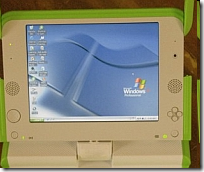
The OLPC (X0) does windows!

Shocking news from New York Times is that the passionately open-source team behind the hundred dollar laptop have done a deal with Microsoft, so that the X0 laptop can run Windows as well as Linux.

After-shocks are flowing throughout the community, with several leading OLPC developers resigning and much angst being aired in the blogospere - as well as some misleading "microsoft buys OLPC" headlines. image

So what really happened?

OLPC has agreed to make a few modifications, so that the XO has more power, can support larger memory cards, and can therefore run Windows (as well as Linux). Total cost to the punter: around $10 more.

Why is this a big deal?

For Microsoft: Corporate market share.

They are trying very hard to be big in education, to be big in the 3rd world, and to be big on small-devices (pardon the pun). The success of initiatives like OLPC was proving that they were failing in this ambition - but now they are back in with a chance. The big compromise they have made is to accept the OLPC can be "dual boot", supporting Linux/Sugar as well.

For OLPC: Fundamental clash!

Many of the teams working on OLPC were doing it for free, for a passionate belief in Open Source, and the power of the collective mind to solve world problems. They were not in it for the money. This is starkly at odds with Microsoft's image, which is why this news is generating such a lot of fall-out.

And what is likely to happen next?

OLPC has been suffering quite a few pains recently. All the tricky bits of deploying and distributing thousands of devices to hard-to-reach places. There have also been several high-profile splits and departures in the senior teams. At the worst, this news could drive away many of the remaining enthusiasts, leaving a chronically depleted team. At best, this could drive significant new sales, and re-energise OLPC, helping them become more successful.

For a well thought through essay on the OLPC problems, from the inside, see Ivan Krstić's post

The bad news: this calls into question the roots of our belief in the power of open source to solve big problems. Sadly, power and politics always seems to get in the way.

The good news: OLPC wasn't all about software and equipment anyway - it is really all about learning. Using learning-centred technology to support 3rd world kids, and leapfrogging their life chances with education. This hasn't changed ... all that has happened is that their devices have got a bit more powerful (and possibly, expensive)

I say we focus on the learning - and make sure the OLPC keeps its learner centred ethos, regardless of the technologies

Friday, April 25

Linux "goes large" in Brazilian schools


Brazil has been stealthily growing an amazing sounding project called ProInfo

They are rolling out infrastructure, technology and software to reach 36million students by the end of this year, with more to come!

The software is Linux (KDE desktop), The technology comes as an instant "computer lab", in a couple of different flavours:
  • an inner city one (more seats per single, shared server)
  • a rural one (simpler / lower power usage)
  • a presenting one (one piece of kit with integrated projector, cpu, bundled content and DVD player)
  • an accessible one (huge screen, and extra accessibility devices connected)

I had heard rumours of this, but with no idea of the scale, or the fact that the roll-out includes open content as well.

ProInfo is not about mobility, but a parallel project UCA (One Computer per Student) is. They are about to launch a second phase, buying 150 000 portable machines. Possibly ClassMates, or OLPC.

Wow! The numbers are staggering. The vision bold. The open source world excited. We wait, with baited breath ...

Tuesday, August 7

Converting phone video to play on your PC

In the mobile learning world we seem to be forever converting media from one format to another. This is often because phone manufacturers are pushing the envelope in compressing media (especially video), but the PC players are a bit slow to keep up.

This is exactly the time to turn to the Open Source community, and today's post is to point out a few excellent sources of free media conversion.

To play back the file without converting it:

Use VLC media player to play just about any media file.

If you just want to convert the damn file:
Try http://media-convert.com who will convert just about any file to just about any other vaguely relevent format. So upload your phone-video, and get it returned as a wmf or mpeg that will play back nicely from your PC

Alternatively, download super which is ... well ... super at converting most files into most other file formats.

If you are a developer:
Our mediaBoard product needs to support just about any format of media from any phone, and convert it into a web-friendly format, and for this we use the excellent, open source FFmpeg component. If you need to convert your media files, they are well worth checking out.

Thanks to these sites, and the developers behind them for helping out countless of our m-learning users over the years!

G

Thursday, June 14

6 million pounds to buy m-learning kit in UK


Wow! MoLeNET (www.molenet.org.uk)

Hot off the press - the LSC is making £6million available for FE colleges (and their partners) to buy m-learning devices.

Colleges are being invited to apply for grants of between £100 000 and £500 000 for capital expenses, to contribute to mobile learning projects. Colleges will need to contribute other costs, like training and support to a minimum of 20% of the funding they recieve.

This is great news, as it is a clear indication that the mainstream has recognised the potential benefits in mobile learning, and is trying to spread the love

If you are in FE and based in England, come along to the open day on 9 July

keepin' it mobile

Geoff

Thursday, September 21

Great tools for learning about IT

Many of the learners on our m-learning projects started as very unconfident users of PCs.

One of the surprise findings was that involvement in mobile learning was a very solid launch pad into mainstream ICT learning. Mobile learners were building confidence to become ICT learners.

This finding has been confirmed in several LSN reports and papers

But what next? What are the tools you can use to inspire learners, and teach them about the web at the same time?

Here is a list of some great ones. if you live on the web, you see these apps everyday, but if you are only just starting, they are probably exactly what you need to start enjoying your new journey into IT.

Forget the primitive "this-is-the-mouse-and-this-is-a-monitor-and-this-is-the-CPU" genre. This is exactly what a cautious student does NOT need. Rather, get them into photography! Help them publish their holiday snaps. Record a tune.

The list, below, is only a small selection of ideas. I have posted it not with Blogger, but with a Google Notebook. Yet another great tool to help you publish yourself online, simply:

Notebook list of great, FREE, ICT-learning applications

Related (possibly!)

Related Posts with Thumbnails