Showing posts with label applications. Show all posts

Thursday, October 24

Top mobile apps for presenting

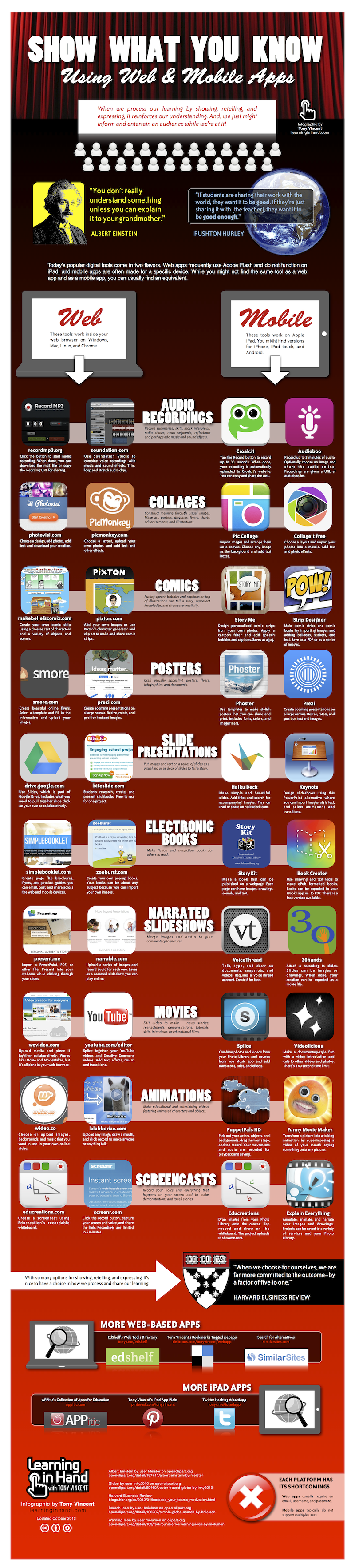
We all know that mobile can be very effective in a classroom as a tool to "do stuff". Here is a fantastic round up of all the best apps, and websites that your students can use to record, show and tell what they have done.
Even if you think you know it all - I guarantee you'll get a few new ideas by the time you finish reading this infographic!


How are you planning on using this?
Thanks to Tony Vincent at learninginhand for the excellent round up!

Wednesday, September 26

MobiMOOC 2012: Mind the Gap

This morning I completed the second of two online presentations as part of MobiMOOC 2012 (an online, free to access course on mobile learning).

 Initially, when I was asked to do a session on "mLearning pedagogy and learning theory" I thought they had the wrong guy. I have been deeply involved in mobile learning (both envisioning it, and making it) for over 11 years, but very little of that time has been spent in pure theory.

Almost all my time has been spent trying to understand how to REALLY make mobile learning work, in a meaningful and practical way. Not just the theory, but the real down-n-dirty practice. Together with my team we have been building apps / authoring tools / SMS engines / platforms / mobilized content and then using these with hard-to-access learners across the globe, trying to figure out what really does work, and add benefit.

After confessing this to the organisers, it turned out that this was exactly why they wanted our input, so we did a session titled Mind the Gap (or, where mlearning theory meets practice)

This is the ppt we did. There is also a youtube recording of the entire session!


Our main approach was to:
  1. explore briefly some of the academic theory, and frameworks often mentioned in mobile learning
  2. discuss the challenges in really making use of them, practically
  3. work together to propose some suggestions / guidelines
  4. look at a few real life examples. Projects my team have been involved in.
Feedback from the online attendees was overwhelmingly positive, and we had an animated debate running in parallel (with huge thanks to my colleague, Jo Colley, for keeping it flowing).

What do you think of the issues, and ideas?

Friday, September 2

Google’s App Inventor … liberation or stagnation?

app-inventor A year ago, Google released App Inventor – a fascinatingly visual, albeit rather buggy tool for developing android apps. Although not robust enough for our commercial development, we loved the fresh ideas about interface, and app building. Perfect tools for learning about coding. Today I found an email in my inbox announcing that Google are dropping support for it.

Google are open-sourcing the code base. Often a sign of a project’s demise. Sounds like bad news for education … or is it?

Wednesday, October 6

iPad + apps = amazing archaeology

trowel_v2_small

(by Andrew Merryweather - @merryux - our UX guru) 

The iPad, loaded up with a few off-the-shelf apps, is revolutionising the way archaeological digs are run.

As an ex-archaeologist I keep an eye on digital trends in the digging world, and came across a great post on Apple.com about an old friend and colleague Dr Steven Ellis of the University of Cincinatti and his digitally-enhanced fieldwork at Pompeii. He is using iPads, with simple off-the-shelf apps to collect data in a simpler, and more shareable manner than ever before.

Computers and archaeology have a long history, but excavators have been waiting for mobile tech to hit the right balance of portability, usability and power to really have a big impact on the way they conduct fieldwork. The latest generation of mobile devices, and especially the iPad, has hit the sweetspot.

Ellis credits the introduction of six iPad devices at Pompeii with helping his team solve one of the most difficult problems of archaeological fieldwork: how to efficiently and accurately record the complex information they encounter in the trenches.

This kind of digital data collection could be a learning opportunity in the making. There's a chain ready to be created which takes live data from field projects (in any scientific discipline, not just archaeology), being captured by fieldworkers on iPads, iPhones, and other devices, and feeding it up to a web site, from where it could be pulled directly into a classroom.

It's not hard to imagine a collection of classrooms 'partnering' a dig, and getting data piped straight from the trench to a few iPads of their own. Activities could be built around looking at the latest photos and maps each day, discussing the latest finds, following the life of the project from start to finish.

M-learning with a twist?

If you like the sound of this, please also check out Nick Short’s work at the Royal Veterinary College. He is using Android devices, and off-the-shelf Google tools to support Vets in Africa collect and share some extremely valuable data  

Thursday, September 9

Apple u-turn is excellent news for cross-platform app developers!

imageThe big news of the moment amongst App developers, is the surprise announcement by Apple that they are relaxing some key restrictions on how Apps can be made. In particular they say:
…we are relaxing all restrictions on the development tools used to create iOS apps, as long as the resulting apps do not download any code. This should give developers the flexibility they want, while preserving the security we need.
As one of a small (but enthusiastic) set of app developers striving to make cross-platform apps, this is a HUGE deal.
Apple is not against cross-platform apps per se, but until recently they were very against Adobe & Flash, and their previous stance was to a large extent an attempt to block several different technologies that allowed Flash apps to be automatically disassembled, and automatically re-assembled into an App.
Ignoring the Adobe vs Apple squabbles for a moment, there was another group of developers who were being caught in the fallout. Those are the app developers using one of a few choice systems (many open source, collaborative frameworks) that allow you to code once, and deploy to iPhone, Android, WinMob, Blackberry …..
The smallprint of the Apple restrictions, also restricted this sort of App. And an increasing number of them started getting refused across all of the frameworks
The fundamental technical problem is that it is not possible to write one piece of native software that plays on iPhone, Android, WinMob, etc. They all use different languages. The only way to do this is to use a computer to generate multiple different versions for different platforms. And it is this interim computer intervention that caused the trouble.
But – today this has changed. And all the cross-platform app developers around the world are heaving a sigh of relief
So – good news for cross platform mobile apps!
(Another equally interesting development, is Apple going public with their developer guidelines – previously us developers had no way of knowing the criteria used to decide whether to accept, or reject an app!)
For a quick synopsis of the top tools for building cross platform apps  read on …

 Appcelerator Titanium - http://www.appcelerator.com
Like most on my list, Titanium lets developers create an app in traditional web coding (HTML, CSS, Javascript), and then it renders the web code into a native apps for iPhone and Android (Blackberry in the pipeline)
The system builds apps. But you also get access to the converted (native) source code which allows for a second round of platform specific tweaks - if you know what you are doing
Initially Titanuim started as fully open source, but now a “free” and better supported “pay” version.
Nice review here: http://labs.thesedays.com/2010/02/04/review-of-appcelerator-titanium/


PhoneGap - http://www.phonegap.com
Like Titanuim, developers code their app in web coding. Unlike Titanium, the final app that is built still contains the original web coding, but buried within the app. Fully Open Source, all the app code is available, and can be customised for your own needs
We use both of these two quite a bit, and they are both great. Lightweight native apps embedding web-apps that can be both online, or offline. 
Although not really “app building”, special mention needs to go to JQTouch (http://www.jqtouch.com/) and Sencha Touch (http://www.sencha.com/products/touch/), 2 AJAX frameworks that you need to use if you want web-apps to look and feel like native apps 


Rhodes / RhoMobile - http://rhomobile.com
Rhodes is a harder-core techie solution, which tries to do without the browser, giving you tools to build cross platform native apps. Free to use (MIT license) plus premium support options
it is good – but uses Ruby as a programming language. Ruby has a cult-like following, unless you are already a Ruby developer, you may be better to stick to one of the other options
One of the big advantages of Titanium over RhoMobile is that with RhoMobile you don’t get any source code – only the finished (and un-alterable app). But it does support more phones (iPhone, Windows Mobile, RIM, Symbian and Android)

These three are the main players. They have very technical arguments with one another about exactly how “native” each other’s apps are – but in all cases they use the same basic trick – embedding a web-browser into the app, and using that to deliver web-esque layout and features in an app

Others worth looking at include


Grapple Mobile - http://www.grapplemobile.com
Grapple are not Open Source. They recently hit the news with some (untrue) speculation that the 7 month old startup was bought for £15m! They use a similar approach as the previous systems, as well as a secondary system to support older phones. (On iPhone and Android, it uses Webkit. On Blackberry and Symbian it compiles to J2ME.)
Most commercial engagement with them seems to be from marketing and advertising companies
 

MotherApp - http://www.motherapp.com
Like rhomobile, motherapp tries to build native apps without needing to include a browser in your app. We have only recently found out about MotherApp, so don’t know much about it apart from the fact that you use a special subset of html to define your app, then upload to motherapp who will render it into native apps for different devices, passing any calls for data back to your website (supports iPhone, Android, WinMob)

Corona (by Ansca) – Corona is specifically for building games. You need a Mac to develop in it, but you can build apps for iPhone, iPad & Android. It uses the unusual Lua language, which is purpose built for describing 3-D type games (like World of Warcraft!)
Free 30day trial, then fairly inexpensive developer license (currently $99)
 
If you want to find out more, there is a very considered, and well presented comparison on AMLCode’s site

There are also A LOT of offerings that help you build apps automatically. These are not developer tools as such, but do allow non-technical people to auto-generate apps. Examples include AppBaker, App Inventor, AppMakr, AppBuilder, MyAppBuilder, Wapple and more appear every day.

If you would like me to post a bit more on these apps, either the developer ones or the others, leave me a comment

Thursday, August 19

why mobile changes things?

Living in the middle of “mobile learning”, it feels totally obvious that mobile is important, and that it fundamentally changes the way we look at information … but I can’t help noticing that not everybody else shares my view!

(shocking, I know!)

That’s why I really like Bryan’s presentation – with (quite a lot of) simple, non-technical images and statements he manages to capture the excitement, the challenges, and the diversity of the mobile landscape


I especially like the simplicity he uses to get the message across – if I wasn’t already enthused, I would be now! Thanks, Bryan

Tuesday, June 1

Can my m-learning course run the same on every phone?

There are a few m-learning conversations that pop up again and again when talking to clients about mobile courses. It often starts with a seemingly simple question:

“I want richly interactive content for any phone”

“Will it do Blackberry? And iPhone? And Nokia?”

“all my students need to have the same access to learning”

These are good questions, and the obvious response to any is “yes, of course”, because we would all like equality between mobile users. But there is a painful reality that (right now, in 2010) makes this an impossible dream:

The painful reality about making m-learning content is that there is no single solution to push richly interactive mobile content onto every possible phone. Rather, there is a spectrum of possible solutions: On one side, going for the richest possible interactivities (but narrowing down to single platforms) and on the other side going for the widest possible phone coverage (but limiting interactivities to the very lowest common denominator)

Examples on either side of this spectrum would be some of the delightfully interactive apps you can get for the iPhone (which exclude all other devices) vs several SMS / text messaging solutions (which work on just about any phone)

This spectrum is just the reality. There is no getting away from it. if somebody tells you otherwise they are not seeing the whole picture.

M-learning developers have been trying many creative approaches to cover as wide a range on this spectrum as possible, but it is technically impossible to cover it all. Examples are:

- making a different app for each device, playing whichever bits of the same central content that device supports

- delivering media-only courses (video or audio) that make up for lack of interactivity with wide device coverage

- using 3rd party players (like Flash, or eBook readers) to render a common course format to different devices

- putting content online, in the browser, and allowing the web-server to decide which versions suit your device

In all of these scenarios, there is a functionality sacrifice (because you are not exploiting device specific features, like GPS), but the benefit of create-once but used-by-many.

So, if you are thinking of making your own mobile content, my best advice is to be pragmatic about this spectrum of solutions. Instead of starting with the big dream (“for every single device”) rather start a little more pragmatically by narrowing the range of technologies you are looking at, and them work backwards to see which type of authoring tool or technical approach works best.

A popular example of a narrower range is "smartphones", though depending on who you are trying to reach out to it might also be "phones with decent browsers".

Another good subset (if data rates are not an issue) are phones with decent browsers, since the latest smartphones and high end featurephones all have a pretty good web browser, which is a lot more standardised than their operating systems.

Currently, my team in Cambridge cover the spectrum via a hybrid approach. We build for iPhone and Blackberry by hand. We have a java (j2me) engine we use for old-skool phones. We use a hand-made authoring tool for WindowsMobile / Android / UMPC / Linux / Windows / Mac (also sold commercially as MyLearning Author). We use another handmade tool for SMS activities (SMS Quiz / SMS Survey).

A lot of our current research work is looking at a hybrid between our MyLearning app (building installable learning apps) and browser-based content (wider cross-device support), so that we can get the best of both – with content that can be installed like an app, runs both on- and off-line, and uses the browser to play back courses wherever possible.

Friday, March 5

Even the US Military wants mobile APPs!

There has been a flurry of news over the past few days including the words “US Military” and “mobile Apps”

part one:

DARPA, home of the pentagon’s technology research gurus, has announced it wants to buy an “AppStore” to use for distributing mobile apps to soldiers.

This is newsworthy on several fronts:

1: DoD (department of defence) are thinking of using normal, everyday-type connectivity (3G), on normal, every-day type devices! (Android)

2: They plan on taking their own 3G coverage with them, to save relying on the possibly unfriendly locals when in far away lands

3: they have dropped both WindowsMobile and iPhone in favour of Android

4: they plan on asking the open market to bid for funding to make apps


Read those again. Bog standard kit. Mainstream networks. Open standards. Open market for apps. Wow.


part two:

A couple of days later, DoD announces the A4A (Apps for the Army) initiative to encourage software-savvy soldiers to propose and make apps (mobile and other).

There is only enough funding for 100 lucky soldiers, but this is clearly just the beginning because …


part three:

DARPA are expected to announce that they are looking to buy apps. If you have a good idea for an app, and the technology skills to make it, they might well be in the market to buy it.


“Flurry of news” is definitely the phrase, here. Until a few weeks ago I had seen hardly any publicity from the US military around mobile learning. Here in the UK, there has been a bit more, with people like Major Roy Evans who has been doing some innovative trials in Iraq and Afghanistan.

You can here him talking about it here (though you will need to ffw the first few minutes, which have no sound!)

Publicity. Nice projects. But quite small trials.


Now, all of a sudden the US has significantly upped the game and leapt for a very mainstream, and imminently achievable solution. Wow!


Bring on those Android Apps, and as Google says, “don’t be evil” :-)

Thursday, November 5

I’ve hacked you – now pay me!

All this week, Dutch iPhone users have been seeing this message on their beloved devices

your iPhone has been hacked because it’s really insecure! Please visit xxxx/iHacked and secure your iPhone right now

Together with a request for $4.95 for help securing their phone.

What’s going on?

It turns out that an enterprising Dutch teenager (PureInfinity92) managed to hack a large number of Jailbroken iPhones, flagging up a couple of well known security breaches. He used a combination of port scanning and OS fingerprinting to find iPhones in T-Mobile's 3G IP range and exploit a known security risk in those that were jailbroken (OpenSSH is installed with the same root access and password on all devices!)

Unfortunately for his entrepreneurship, he was quickly outed, and his paypal account blocked. He has apologised to all, offered refunds to those who paid up, and made his security advice available for free

In fairness to the guy, his original message did say:

If you don't pay, it's fine by me. But remember, the way I got access to your iPhone can be used by thousands of others. And they can send text messages from your number (like I did..), use it to call (or record your calls), and actually whatever they want, even use it for their hacking activities! I can assure you, I have no intention of harming you or whatever, but, some hackers do! It's just my advise to secure your phone (: Have a nice day!"

Find out more from the original Dutch posting (translated by Google)

So – why use Jailbreak at all?

One of the biggest problems with using iPhones, and iPod Touches as learning tools is the “closed shop”, when it comes to sharing, and distributing Apps. Teachers cannot easily share content they have made.

Developers need to pay, and be approved by Apple. All applications need to go via Apple(iTunes), and be approved by Apple. Added to that, many countries (like most of Africa!) are not even allowed to download apps from iTunes. This is a MAJOR restriction on educators looking to make and share applications.

Jailbreak is the widely used, though not-quite-legal technique of unlocking your iPhone so that applications can be directly uploaded without going via iTunes and the AppStore. Unfortunately though, it is (by definition) not as secure as the Apple’s proprietary approach, which is why PureInfinity92 managed to hack as many phones as he did.


Our m-learning.org team do certainly not recommend jailbreaking your iphone, though we are very against the current restrictions on regular teachers making and sharing Apps and look forward to the time that Apple opens access to their Apps up a little more (like all the other mobile App stores!)

Tuesday, November 3

Flash on my iPhone? It’s showdown time!

  • For several years Adobe has been promoting Flash as a great technology for mobile devices (and it is).
  • For several years Apple have been making amazing mobile devices (and they are).

… and, for some bizarre reason, the two have been bickering all along, and never quite making friends.

The latest move in the ongoing showdown is this slightly aggressive message iPhone and iPod Touch users get if they visit a website requiring flash: 

Apple restricts use of technologies required by product like Flash Player. Until Apple eliminates these restrictions, Adobe cannot provide Flash Player for the iPhone or iPod Touch 

This is Adobe’s second move in the past few months to push the blame back onto Apple. They also announced that the next version of Flash Professional will allow developers to build iPhone apps from their Flash projects.

This is great news, as it will open up App development to the vast army of skilled Flash developers and coders out there. And the announcement was made via this hilarious “myth buster” movie


But – the bickering is hardly over, and iPhones will still not be “running Flash”. There remains no support for websites containing Flash. If you want that, you had better stick with your:

  • WindowsMobile
  • Android
  • Blackberry
  • Palm Pre

etc etc etc devices!

Friday, June 19

mobile learning in a taxi …

BLOOM-ing marvellous! We are in the closing stages of a great project called BLOOM, which is all about using m-learning in the workplace (in this case, for the transport sector).

Have a look at this great little video of our mobile learning solution being used by Taxi drivers while waiting on the rank (errm … no … not while driving!)

A great example of how mobile learning can help you reach the parts other types of learning can’t


Hope you like it – and please leave us comments with your thoughts. We are thinking of releasing a couple of other, similar case study videos if there is demand for them

Monday, January 14

$10 million from Google for cool mobile apps

The Android Developer Challenge: Google has offered $10 million to developers for the coolest, most interesting, creative applications that will run on their new mobile operating system.

Android is the google sponsored operating system that they hope will run on all future phones, and with true google flair, they are offering some no-strings-attached funding to encourage developers to get involved.

If you want some of this money, you will need to move fast, though. They have split it into two packages:

Android Developer Challenge I: Happening now. You need to apply before March 3, 2008.

The top 50 entries each get $25K to fund their work, and then they also get the chance to apply for further grants (ten $275K awards and ten $100K awards)

Android Developer Challenge II: This part will only happen once the first android handsets become available - so we are talking the second half of 2008


As always - a breath of fresh air. Lets hope that some of those winning apps are good for learning!

If you want to find out more, visit the android site

Thursday, November 8

gPhone anyone?

Finally, some tangible news about the gPhone, or "Google phone"!

It turns out there isn’t going to be a physical device at all, but rather a heavy-weight alliance (the open handset alliance ) who are getting together to create an open source platform for mobile devices.

Loads of big names are involved: Google, HTC, LG, Motorola, Samsung, T-mobile, Intel….

Notable absences: Nokia and Vodafone

The platform is currently called "Android", and if you have ever tried developing software for phones, you will love all the promises that seem custom-made to make battle-weary J2ME and Symbian developers smile once again:

Android does not differentiate between the phone's core applications and third-party applications. They can all be built to have equal access to phone's capabilities


Android is built on the open Linux Kernel


With Android, a developer could build an application that enables users to view the location of their friends and be alerted when they are in the vicinity giving them a chance to connect.

which means I really really can use the phone features

There will be a publicly accessible repository, similar to how the Linux kernel is managed.

which means I can un-install those default apps I don't want

To find out more, look at the Official Google Blog: Where's my Gphone?


Great news all round. Now, lets hold our m-breaths to see if it really can offer what it claims, and if those phone manufacturers really do deliver.


ps: thanks to Bob and Juan who got me onto this

Thursday, January 4

Stop ActiveSync asking about partnerships!

Every now and again I stumble over a small technical solution that makes a big difference to my sanity. Here is an essential one for anybody managing multiple PocketPC devices.

If, like us, you use your PocketPc as a shareable learning device and NOT as businessman's tool you will know the frustration of having to tell ActiveSync NOT to form a lasting friendship with your devices everytime you connect them. This is especially true if all you are doing is uploading files to them.

Well, did you know you can turn this off?

You can configure ActiveSync to always assume you want to be a guest.

The trick is that you need to change a registery setting, but Bob, one of our mobile developers, has kindly created this little utility so you can do it yourself:

You will need to download and open our handy ActiveSync Dialog Tweaker utility

To switch "Guest only" mode on, run this file: active_sync_guest_only.reg

To switch back to "Ask me" mode, run this file: active_sync_guest_ask.reg

You can run both of these files directly, just say Yes when it asks if you want to add the information to the registry.

hope these tips find a use somewhere in the mobile ether!

:)

Smallprint1: any registry settings are changed at your own risk

Smallprint2: Guest only mode will only work if
no partnerships have already been established on the desktop.
If a previous partnership has been established, the ActiveSync UI can be suppressed by clearing the Open ActiveSync when my device connects checkbox in ActiveSync's Connection Settings dialog.

Monday, December 4

A Beacon award for mobile learning!

We have had a couple of loyal, enthusiastic user-groups who have been involved with mobile learning from our earliest public trials back in 2003 right through to today.

One of them, Pembrokeshire College on the beautiful west coast of Wales, has just won a Beacon Award for their use of mobile learning.

Congratulations to Geoff Elliot and the team!

They have been doing amazing work, and deserve all the credit coming your way. (Geoff is the guy hiding at the back of the photo taken from the college news page)

For those not yet in the know, Beacon Awards recognise imaginative and innovatory teaching and learning practice. In the case of Pembrokeshire they won the FENC award with recognises the leading work they are doing allowing learners to build their own learning via collaboration and sharing.

The FENC ethos is: "Take, Shape and Share" - and Geoff's team have made that work via mobile learning.

This news is so hot off the press, that at the time of writing, the AoC Beacon site doesn't even have this years winners listed yet!

Wednesday, October 11

Make your own Playstation (PSP) resources!

Wow! This is a hot-off-the-press sneak preview.

I have just seen some of our mobile learning materials running on a PSP!


We have been dabbling with it for a while, but what I am looking at right now is materials, built by a non-technical author, using our Mylearning authoring tool.


The games were intended for display on a PocketPC, but the team here in cambridge have been reconfiguring our mobile framework, and now it runs just fine on the PSP as well!!!

It looks awesome. (if I say so myself)


Yet another step forward to give authoring tool to the masses, so they can transform all sorts of mobile devices into learning tools!

So far, I know that they have been used on TabletPCs, UMPCs, PCs. PocketPCs and Whiteboards - but this is the first real gaming platform to be included.

Huge thanks to Juan, Ivars and Chris who helped make this rather out-there dream into a reality!

Thursday, September 21

Great tools for learning about IT

Many of the learners on our m-learning projects started as very unconfident users of PCs.

One of the surprise findings was that involvement in mobile learning was a very solid launch pad into mainstream ICT learning. Mobile learners were building confidence to become ICT learners.

This finding has been confirmed in several LSN reports and papers

But what next? What are the tools you can use to inspire learners, and teach them about the web at the same time?

Here is a list of some great ones. if you live on the web, you see these apps everyday, but if you are only just starting, they are probably exactly what you need to start enjoying your new journey into IT.

Forget the primitive "this-is-the-mouse-and-this-is-a-monitor-and-this-is-the-CPU" genre. This is exactly what a cautious student does NOT need. Rather, get them into photography! Help them publish their holiday snaps. Record a tune.

The list, below, is only a small selection of ideas. I have posted it not with Blogger, but with a Google Notebook. Yet another great tool to help you publish yourself online, simply:

Notebook list of great, FREE, ICT-learning applications

Related (possibly!)

Related Posts with Thumbnails