Showing posts with label innovation. Show all posts

Friday, February 21

Google Glass - a tool for learning?

Google glass is seriously overhyped at the moment. So much that it is hard to see the wood for the trees, or to separate out the real learning possibilities from the general technical enthusiasm.

That is why I really enjoyed David Kelly's presentation at Learning Technologies this year. He has been wearing them for a while, and gives a really grounded assessment of the ways that glass can empower work-based learning, as well as explaining several of the downsides.

It was a great session. Click the button, below, to see a recording of it. What do you think?


(If you are not seeing a button, try clicking this link instead)

Thursday, July 25

Wikipedia Zero launches in India!

Wikipedia Zero - an ambitious project aiming to bring free access to Wikipedia to all developing countries - has signed it's first deal in India.

Wikipedia zero

This is great news for the 60 million subscribers of Aircel (India's 7th largest network provider), who now get free access to all wikipedia information via the Wikipedia Zero. This is also great news for the developing world at large. The more popular demand for this, the more local operators will take heed, and offer this free data access to their subscribers.

This brings the number of people with free access to over half a billion! If you are in one of the following 17 countries (and using the right network), you won't need to pay any data rates to access all the knowledge in Wikipedia:

Uganda, Tunisia, Malaysia, Niger, Kenya, Montenegro, Cameroon, Ivory Coast, Thailand, Saudi Arabia, Democratic Republic of Congo, Botswana, Russia, Indonesia, Pakistan, Sri Lanka, India

Wikipedia Zero works in the same way as Facebook Zero, offering a minimal (low data) version of their site to specific operators, and covering the data costs themselves. Users can browse on that specific URL, without paying any data charges.

Users can access Wikipedia at zero.wikipedia.org and  m.wikipedia.org - but if you are browsing from a different network, you won't get it free (in the case of "zero", you might not even see it!)

We haven't been able to test the difference is between the "m" and the "zero" sites, but believe that "zero" has no images at all, and is even faster, with a more minimalist design to perform better on low end devices and slow connections.

It is not really possible to estimate the impact of sharing free knowledge with hard to reach areas in the world without getting all misty eyed and coming up with bland generalisations, so I'd rather like to point you to one small story from a shanty town just outside Cape Town, South Afrtica:

The view outside Sinenjongo High School, Joe Slovo Park, Cape Town, South Africa-3438

Sinenjongo High School is made of old shipping containers, in a township of very poor dwellings, populated by people who really do not have very much going for them, apart from their own energy, and initiative

Staff and kids at the school heard about Wikipedia Zero - which is NOT currently available to them, and set up a petition to the local network providers to sign up.

This made the local press, which caught the eye of the South African wikipedia team, who passed on the message to their global team.

This in turn, helped generate huge online interest. See this fantastic blog post from from Victor Grigas, a wikipedian who was so inspired he made his first trip to Africa to meet the school

The story isn't over yet. South Africa doesn't have Wikipedia Zero. (nor do many other needy countries), but the more voices that are heard, the closer we will get to freedom of information, and rights to knowledge!


Spread the word

Monday, March 4

UNESCO Mobile Learning Week 2013 - free resources

The joy of momentum! UNESCO has come out firmly in favour of mobile learning, and published a series of very well researched guidelines on how to make use of it. See below to links to all the resources.

NewImage

To quote them:

The Symposium allowed UNESCO to launch its most important mobile learning publication to date: The Policy Guidelines for Mobile Learning. ... the Guidelines provide practical advice to policy makers seeking to transform increasingly ubiquitous and affordable mobile devices into tools for learning. Existing policies have very little to say when it comes to questions of whether and, more crucially, how to incorporate mobile technology into education. The flagship UNESCO publication … helps fill this void. 

It was a great honour to be one of the speakers at the symposium, a gathering together and sharing of experiences between many of the global leaders in mobile learning.

My session can be found here: 

I did a 3-way combined session with Lucy Haagen and Theo van Rensburg Lindzter, whose presentations are here:


For ALL the other presentations, and media from the event, see below:

So what did we think? Great opportunity to meet with fellow innovators from across the globe. The UNESCO guidelines are a valuable resource for all. But as champions for "out of school learning" we felt that there was a large, and gaping hole. What about "out of school / adult / working learners"? The focus was too much towards school age learners.

A lot of thought had gone into how to impact government policy, and improve access to IT in schools. But very little focus was put into those areas that fall outside the remit of school, yet are still very much within the remit of UNESCO. Encouraging new, and enlightened opportunities for adults, by increased access to learning and training at home, and at work. 

This was acknowledged in one of the closing sessions, when Fengchun Miao from UNESCO mentioned this omission. We look forward to supporting UNESCO in putting this right!

Thursday, January 10

AR in mobile learning

Are you using Augmented Reality in your mobile learning? Should you?

AR, or Augmented Reality has been high on the hype-charts for several years now, but seems to be on "slow burn" when it comes to m-learning. This post is a quick update on what's happening, where, and what it means for education.

If you are unsure what AR is, here is a great explanation from those nice folks at Common Craft


So pretty much anything that helps you connect the real world around you with the digital, or virtual one classifies as augmented reality. You don't even need to superimpose it on the camera view if you don't want to. Examples like QR-codes, or bar code scanning also connect the real to the virtual, without requiring the real-live-view.

But for now, lets stick with live-view AR. One of the classic (and often quoted) examples of AR in workplace learning is this project from BMW. It isn't really being used, though. It was a demo made over 5 years ago by their R&D people, but if you haven't seen it yet, it tells a great story


Clearly an idea with merit. But what's been happening in the past 5 years? A lot, as it turns out!

Several companies (including my own) have been investing heavily to push this sort of technology out of the labs, and into the mainstream. There seem to be 2 main approaches when it comes to apps:

1: Geographical information, downloadable as layers.

layar screen images from FastCommpany
The two main players here are Layar, and Wikitude.  Both offer a free app in the app stores, and allow you to download many different layers of information that will pop up as you move your camera around.

Bear in mind that this is GPS data, so you need to be outdoors, and positioning is not 100%. But, nonetheless, great fun to play with, and surprisingly easy to make your own layers. Fancy setting up a history trail around your town? You can upload all the data as a new layer, and share with any other app users!

2: Visual (and other) Triggers.

But what about augmenting non-geographic things? This is where "triggers" come in, and the advertising world gets even more excited.
Your phone recognises visual images, and triggers an augmented response. Apps like Blippar do this - you have probably seen their logo on film posters, magazines and product adverts. Once you have downloaded the Blippar app, you can scan any known products / posters / images to triggers some form of media to be superimposed over your camera view.

Here is a super-stylish example promoting the new Hobbit movie.


Clearly the result of some slick media work, but the great news is that this sort of magic is no longer in the realm of impossibly expensive. In fact, all the software required to make the AR, and image recognition work for this sort of thing is available for FREE.
That's right, free.

You still need a developer to build it into your app, and some media skills to create something worth showing, but the heavy technical lifting has already been done, and all of a sudden AR becomes a lot more affordable.

The question is no longer "is this possible", but rather "how could I use it for learning"

Blippar use the "one app for all our AR" idea, much like Wikitude and Layar. But increasingly you also find apps dedicated to one specific theme, embedding the same AR capability within them.

Here is a great example that has the added benefit of NOT being about product placement.
The Science Museum in London have an awesome AR trail. As you walk around the museum, you can scan different exhibits to have a real-life 3D version of James May popping up on your screen to talk to you about it. (the app itself isn't free, but you can get a good flavour of it in this video)


Think about this for learning. You don't need a talking person to pop up. You could as easily launch animated diagrams of machines, or straight video clips

Vuforia
The free developer kit I mentioned before is called Vuforia. It is the engine underpinning most of the AR you will see
in the mainstream media today. Right now the majority of the use cases still seem to be in the advertising space, but I'm looking forward to see more educators playing around with AR.

Have you tried AR yet for learning? What did you do?

UPDATE: A few days after this blog post, there was a public preview of Big Bird's Words, a new app for kids that uses some of the very latest Vuforia features to help (surprisingly young) kids find specific words in the world around them. This is even-smart AR, including live character recognition. Super cool!

Tuesday, October 30

Wave Riding Theory - a fresh look at learning technology adoption

Is there a gap between mobile learning theory, and practice?

How should teachers decide which approaches, technologies, or approaches to adopt with their mobile learning?

As part of my session at MobiMOOC 2012 we explored some of the current theories often applied to m-learning, trying to map them to practice.

Together with my team, we have been deeply involved in mobile learning (both envisioning it, and making it) for over 11 years, but very little of that time has been spent in pure theory, so it was an interesting exercise mapping some of the current theories to live examples, and then discussing with the attendees where the gaps lay (and how we might bridge them)

In the process, we realised that the most crucial step any practitioners needed to take was realising that mobile is coming at them whether they are ready or not. It is not a flood that can be stopped, more a wave that needs to be ridden! This wave-riding theme kept growing, as we discussed the different approaches to coping with the myriad of available devices and approaches, until it became a theory in it's own right!

Wave Riding Theory

The basic tenet of this, is an awareness that mobile consumer technologies are rushing towards us whether we are fully prepared for them or not. Already, more smartphones are sold than PCs, and a huge majority of our learners will use their mobile device as their primary reference / communication / collaboration tool (even if it is for Facebook!)

Rather than try to hold back the tide, our role as educational-techies is to help practitioners learn how to ride it. The wave is rushing at us regardless. It won't wait till we have perfected our art. Instead we just need to jump on, and learn as we ride.

We used this surfing-metaphor to look at various aspects of mobile learning, to extract our key advice. The next slides show advice both for Learning Designers, and for Implementers:

1: The importance of trial and error. Start small. Practice. Keep improving.


Start small. Practice. Keep improving.

2: Keeping supple and flexible.


Keeping supple and flexible

3: Building in resilience. Prepare for the unexpected.


Building in resilience

4: Success is as ART as much as a science.

mobile learning as an art

What do you think? Does the wave-riding metaphor work for you?

The mobiMOOC attendees certainly thought so, encouraging me to do this post, and proceeding to work with us to develop their own top tips for m-learning practitioners

I hope you find them useful!

Wednesday, September 26

MobiMOOC 2012: Mind the Gap

This morning I completed the second of two online presentations as part of MobiMOOC 2012 (an online, free to access course on mobile learning).

 Initially, when I was asked to do a session on "mLearning pedagogy and learning theory" I thought they had the wrong guy. I have been deeply involved in mobile learning (both envisioning it, and making it) for over 11 years, but very little of that time has been spent in pure theory.

Almost all my time has been spent trying to understand how to REALLY make mobile learning work, in a meaningful and practical way. Not just the theory, but the real down-n-dirty practice. Together with my team we have been building apps / authoring tools / SMS engines / platforms / mobilized content and then using these with hard-to-access learners across the globe, trying to figure out what really does work, and add benefit.

After confessing this to the organisers, it turned out that this was exactly why they wanted our input, so we did a session titled Mind the Gap (or, where mlearning theory meets practice)

This is the ppt we did. There is also a youtube recording of the entire session!


Our main approach was to:
  1. explore briefly some of the academic theory, and frameworks often mentioned in mobile learning
  2. discuss the challenges in really making use of them, practically
  3. work together to propose some suggestions / guidelines
  4. look at a few real life examples. Projects my team have been involved in.
Feedback from the online attendees was overwhelmingly positive, and we had an animated debate running in parallel (with huge thanks to my colleague, Jo Colley, for keeping it flowing).

What do you think of the issues, and ideas?

Monday, September 24

MobiMOOC - free online m-learning course happening now!

MobimoocThere have been a flurry of reports in the news recently about MOOCs. Massive, Open, Online courses. Several notable startups have waded in (Coursera, Udacity, edX, Ted-ed), and the early results look impressive.

But did you know that Mobile Learning was one of the early adopters?

MobiMOOC 2011 started the ball rolling last year. A massively online, free, collaboration between m-learning gurus from across the globe (see our summary report)

The next one, MobiMOOC 2012 is happening RIGHT NOW. It is part way through, free, and waiting for you to join in as a lurker, a caution contributor, or a down-right enthusiast!

For a preview of the speakers and sessions, explore the MobiMOOC site

I am curating a strand this week, presenting live on both Tuesday (late) and Wednesday (early), with a parallel discussion forum. The title is "Mind the Gap: exploring the gap between m-learning theory, and practice"

Do drop in. I'd love to see you online.

Thursday, July 19

Mobile Learning interview - geoffstead

While in the states I met up with Ewan MacLeod of MobileIndustryReview who was enthusiastic enough about our mobile learning work to interview us for his site.

As he was new to m-learning (and a good interviewer), the video ended up like a crash course in mobile learning. What works. what doesn't. What we are up to.

Check it out. You'll get our current thinking on the industry, as well as the first public info about the work we are doing to mobilise the US Department of Defense. They are using our mobile toolkit to roll out m-learning across vast numbers of their learners.

Go live within the month.


Ewan, thanks for the enthusiasm.

Do you agree with the points in the interview? I'd love to hear your comments.

Tuesday, June 26

mLearnCon 2012

I was honoured to do a Key Note at mLearnCon 2012 in Silicon Valley, sharing a combined session with Clarke Quinn (@Quinnovator) and /David Metcalf (@dmetcalf)

It was a fun and dynamic session, which seemed to catch the right mix of theory, practise and vision. See my presentation, below:

The session was focussed on some practical lessons from the field (the 3 of us are major m-learning veterans!). My key themes were:

Mobile is NOW, and personal - when your learners are already mobile web users, and smartphones are already mainstream … it is pointless debating whether m-learning is good or not. It is already here. We just need to get better at harnessing it!

One size does not fit all – there isn't only one approach. You need to plan your mobile learning around YOUR learners, YOUR scenario. YOUR domain area.

Learner centred design – It is the learner’s own phone. You need to design your learning around their context, and their needs.

Native app PLUS HTML5 – We are big fans of using HTML5 for all our content, and then blending that with the native app. We use PhoneGap, and build custom plugins, and javascript code to optimise for learning.

Standards decrease risk, and increase resilience – Where ever possible, make sure your content. Your data. The divide between different sections of your platform communicate with open, standard formats.

What do you think? Let’s hear your comment!

Friday, September 2

Google’s App Inventor … liberation or stagnation?

app-inventor A year ago, Google released App Inventor – a fascinatingly visual, albeit rather buggy tool for developing android apps. Although not robust enough for our commercial development, we loved the fresh ideas about interface, and app building. Perfect tools for learning about coding. Today I found an email in my inbox announcing that Google are dropping support for it.

Google are open-sourcing the code base. Often a sign of a project’s demise. Sounds like bad news for education … or is it?

Tuesday, July 26

Best tools for cross platform app development

As part of our work on the MoLE project we have been revisiting the rapidly growing number of frameworks, libraries and platforms that developers can use to create cross-platform mobile apps 

If you are new to app development, you may know there is a constant debate between app developers, building “native” apps, and mobile web developers, championing “web apps”. The native app developers get better performance and integration, while the web app developers get broader reach and better standardisation

In the middle of this debate are a growing team of developers championing a hybrid of these two positions. Developing code once (like “native”) but deploying across apple / android / blackberry (like “web apps”). This is a rapidly emerging area, with a flurry of very exciting toolkits available.

To keep you up to date, we are very happy to share our recent report:

image 

Cross-platform mobile development

a review of the top cross platform mobile app development frameworks, libraries and platforms


Friday, March 12

Digital Giant – Martha Lane Fox on mobile web

Martha Lane Fox drawing the links between mobile + web + social networks + mobile-entrepreneurship

image
http://news.bbc.co.uk/1/hi/in_depth/sci_tech/digital_giants/8551890.stm


It is a 3:40 minute micro-interview from the current BBC series “Digital Giants”. She isn’t saying anything new, but makes the same point that keeps popping up everywhere at the moment …

- mobile is everywhere!

- it is about inclusion, as much as about trendy gadgets

- ignore it at your peril


These points apply to teachers, and teaching too!

I am surprised how often I still get into conversations that start “but do you think mobile learning might work?”.

Of course it works!

In Africa. In Europe. In America. In India. In Australia. For young. For old. For rich. For poor. It may take different shapes, but mobile learning is working well, and is coming whether you like it or not.

Surely it is far better to learn how to make it work well, now, than be a victim and be overtaken by it in 3 years time!

Thursday, January 7

Mobile trends for 2020

As memories of Christmas feasting slowly fade, it is a good time to take stock of the year ahead … and Rudy de Waele (of m-trends.org) has been doing exactly that. He asked all of his mobile gurus what they predicted would happen in the next 10 years, and published them yesterday.

It is kinda long, but full of some great, thought-provoking stuff.

My biggest complaint would be that he has missed out learning entirely. The next 10 years are filled with mobility in every shape and size … except for learning!

Thursday, November 12

Meet Derek Wyatt – the mobile MP

DerekWyatt2I have just finished an enjoyable few hours with Derek Wyatt MP – a true champion for new technologies as well as the first MP to have his own iPhone app!

He blogs. He flickrs. He tweets. He podcasts. Radio5Live named him as the “fastest emailing MP”. His website has overtaken the local paper as a source of up-to-date local news. He even streams all his speeches and interviews. But more than that, he has been working on many of the “back end” policies and campaigns that keep our online-world turning.

Wow. And I thought I worked hard.

It turns out he is a great fan of our work – both in the mobile world, and more generally with our e-learning and technology tools and he gave us some great advice about taking what we do in the UK out onto the world stage.

But what about his iPhone app, I hear you ask?

It is not yet live, but when it is it will give his constituents (Sittingbourne & Sheppey in Kent) mobile access to local news, as well as yet another way of getting hold of their MP

Stylish

DerekWyattWe have a tradition in our office of “Knowledge Shares” – a public soapbox for anybody who has something to share to teach the rest of us, and Derek gamely volunteered a very entertaining 30 minutes of thoughts, advice and gossip ranging from learning technologies, to the 500 emails he gets a day, to some juicy stories that stay within our walls in Cambridge!

A true comedy moment happened when we inadvertently served scotch eggs and pork pies for lunch – it turns out he was outed in the news as a closet lover of pies and eggs.

A great day. Finished when he needed to rush back to Westminster for an un-expected vote in parliament. This is the first time we have met and I hope not the last.

Monday, June 1

m-learning in Denmark – the FLUID way

Top banner

FLUID is an association of “flexible learning providers” in Denmark. We are not talking acrobats, here, but rather practitioners specialising on breaking out of the constraints of traditional learning provision. Many working with teenagers, or adult learners.


They have just hosted ON THE GO, an event specifically to raise awareness in Denmark for mobile learning. Or as it says on their website:

ON THE GO - MOBIL TEKNOLOGI TIL LÆRINGSBRUG

Den 28. – 29. maj 2009 satte FLUID fokus pÃ¥ m-læring: I spændende oplæg blev der diskuteret tilgængelighed, teknologier og set spændende eksempler. Flere af præsentationerne ligger klar til download, og resten vil blive lagt ind over de nærmeste dage.

which sums it up so much better than I could!

I was the only UK contributor, but other international delegates joined from Iceland and Norway and Sweden to inspire and enthuse. M-learning is still at a fairly early stage in Denmark, but already there are several exciting projects and initiatives happening.


If you want a preview of my presentation (without being able to enjoy the pleasures of Copenhagen at the same time) it is up on slideshare:

Thanks Astrid, and the Fluid crew for a great event!

Friday, December 5

Teddies and telephones in space

It is a "proud dad" moment. teddies5_sm

My daughter has been working on a science project to send 4 teddy bears into space.

They launched successfully a few days ago, and this morning almost every newspaper in the UK today is reporting on it (with all the predictable puns):

  • Teddies Boldly Go Where No Bear Has Gone Before
  • A giant leap for bear-kind (sun)
  • Space bears are teddy for lift-off (metro)
  • Giant step for teddies as Britain rejoins space race (times)
  • British teddy bears are out of this world
  • Ground control to major Ted (guardian)

She and her friends are justifiably glowing with pride - her bear, called MAT, is pictured on the left

The teddies went up with a helium balloon, got to an altitude of over 30 km, (temperature below -50 C) and landed safely on the coast after 2 hours of flight.

They travelled in style, connected to Nova 9 (the "mothership") built by CUSpaceflight - a group of Cambridge University students inspired by low-budget space flight. Spaceship2

On board was a few cameras, a super lightweight computer and GPS chip to track it, a radio to report back to the team on the ground ... and ... in case of emergencies ... a mobile phone!

Any teenager could tell you that in case of emergencies, you need to be able to send a text message to someone to pick you up. Nova 9 was no different.

The project was part of an outreach by CUSPaceflight, and the kids - science clubs from two local schools - were experimenting with different insulation and protective layers and clothing for their bears, to keep them from freezing solid.

Find out more by Googling Teddies in space or pick a couple of these links: flight

Local TV news

Press releases

Photos and more

Friday, October 17

Handheld Learning 2008 - the movie!

I am still busy recovering from the amazing flurry of mental and mobile stimulation that is Handheld Learning.

Old friends, new friends, cool projects, scary salespeople, avalanche of new gadgets.

One of the especially noteworthy things was the awesome array of big-hitting speakers, and for those of you unable to be in London yourselves, you can see the whole thing already, online at BlipTV:


Andrew Pinder, Chairman of Becta
Steven Berlin Johnson, Cultural critic & writer
Laurie O'Donnell, Director of Learning & Technology, Learning & Teaching Scotland
danah boyd, Social media scientist
Lord David Puttnam


All of these are well worth a bag of popcorn, and some chill-out viewing time

You can also catch other snippets from the day on the handheld video channel, at http://handheldlearning.blip.tv

Tuesday, June 17

m-learning in South Africa

Tribal's m-learning team were invited to Cape Town to talk about innovations in learning technologies in the UK. We were part of a delegation sponsored by the DTI / TVET to build bridges between the UK, and South African education businesses

The event: CCC (a collection of FE colleges specialising in vocational training)zozo

Our message: in innovations in learning went down very well - though with some incredulity as the the budgets spent on individual students in the UK. The local minister of  education was in attendance and spent some time discussing how we might be able to help them.

Some of the slides are on our Slideshare

The mood: bizarre! There has been a swathe of investment in South African Education, though it seems to have passed the FE sector by, so they really struggle to attract and maintain talented staff. Because of this, all sorts of seemingly innocent comments by the UK delegation triggered passionate responses - with many lecturers standing up and asking the speakers for jobs!shop window

The backdrop: South Africa is in a very difficult time at the moment, with foreigners and refugees being beaten, and hounded out of all the poorer areas. I was lucky enough to be invited to several refugee centres, and to spend some time with the fascinating, but seriously concerned Zimbabweans, Malawians, Nigerians and Somalis. We wish them all well, and hope the South Africa remembers it is the Rainbow Nation!

Monday, May 19

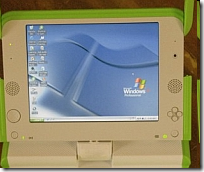
The OLPC (X0) does windows!

Shocking news from New York Times is that the passionately open-source team behind the hundred dollar laptop have done a deal with Microsoft, so that the X0 laptop can run Windows as well as Linux.

After-shocks are flowing throughout the community, with several leading OLPC developers resigning and much angst being aired in the blogospere - as well as some misleading "microsoft buys OLPC" headlines. image

So what really happened?

OLPC has agreed to make a few modifications, so that the XO has more power, can support larger memory cards, and can therefore run Windows (as well as Linux). Total cost to the punter: around $10 more.

Why is this a big deal?

For Microsoft: Corporate market share.

They are trying very hard to be big in education, to be big in the 3rd world, and to be big on small-devices (pardon the pun). The success of initiatives like OLPC was proving that they were failing in this ambition - but now they are back in with a chance. The big compromise they have made is to accept the OLPC can be "dual boot", supporting Linux/Sugar as well.

For OLPC: Fundamental clash!

Many of the teams working on OLPC were doing it for free, for a passionate belief in Open Source, and the power of the collective mind to solve world problems. They were not in it for the money. This is starkly at odds with Microsoft's image, which is why this news is generating such a lot of fall-out.

And what is likely to happen next?

OLPC has been suffering quite a few pains recently. All the tricky bits of deploying and distributing thousands of devices to hard-to-reach places. There have also been several high-profile splits and departures in the senior teams. At the worst, this news could drive away many of the remaining enthusiasts, leaving a chronically depleted team. At best, this could drive significant new sales, and re-energise OLPC, helping them become more successful.

For a well thought through essay on the OLPC problems, from the inside, see Ivan Krstić's post

The bad news: this calls into question the roots of our belief in the power of open source to solve big problems. Sadly, power and politics always seems to get in the way.

The good news: OLPC wasn't all about software and equipment anyway - it is really all about learning. Using learning-centred technology to support 3rd world kids, and leapfrogging their life chances with education. This hasn't changed ... all that has happened is that their devices have got a bit more powerful (and possibly, expensive)

I say we focus on the learning - and make sure the OLPC keeps its learner centred ethos, regardless of the technologies

Friday, May 2

OLPC review: is the $100 laptop good enough?

In theory - we all love the One Laptop Per Child initiative (OLPC). But what is it really really like?

We were lucky enough to get one from Seb at ALT-C. There are so many competing views and agendas around this little green machine that we felt the best way to review it would be collaboratively.

the entire Tribal learning technologies team got in on the act, including animators, UI designers, teachers, academics and programmers.

We also enlisted the real experts: our kids! (aged 6, 9 and 11).

So what is it really like?

In super simple summary, we think the OLPC X0-1:

  • is inspirational, embedding good educational ideas and collaboration;
  • solves several big technology challenges;
  • is great fun, but pretty slow;
  • is full of first-generation quirks;
  • has an amazingly rich seam of support info on the OLPC wiki;
  • leads the field in several key directions, but might be superceded quite quickly?

For a more detailed review check out our posting on Fortnightly Mailing

Many of the first generation quirks we spotted seem to be echoed in the justifications for the shock-double-news that the OLPC president is resigning from OLPC, and that future versions may even support Windows OS!!

Shock horror. This is sending even more ripples around the OLPC community than the news that Intel was pulling out last year, and the competing commercial devices (like classmate and eeepc) that are currently hitting the market.

I kind of agree about the quirkiness of the Sugar interface, and that the users experience could be improved ... but the shock waves are greater than this. They are probably because, until now, the Open Source philosophy has been one of the strongest glues that has held all the OLPC developers together, and adoption of Windows as a platform calls that into question.

Watch this space to see what happens....

My vote?
- OLPC will remain all open source, and will keep championing "freedom for users"
- Other, commercial devices will build on what OLPC has created, offering more and more features for less and less money
- whichever way you look, learners win, so long live the OLPC !!!

G

Related (possibly!)

Related Posts with Thumbnails