Showing posts with label Windows Mobile. Show all posts

Thursday, September 9

Apple u-turn is excellent news for cross-platform app developers!

imageThe big news of the moment amongst App developers, is the surprise announcement by Apple that they are relaxing some key restrictions on how Apps can be made. In particular they say:
…we are relaxing all restrictions on the development tools used to create iOS apps, as long as the resulting apps do not download any code. This should give developers the flexibility they want, while preserving the security we need.
As one of a small (but enthusiastic) set of app developers striving to make cross-platform apps, this is a HUGE deal.
Apple is not against cross-platform apps per se, but until recently they were very against Adobe & Flash, and their previous stance was to a large extent an attempt to block several different technologies that allowed Flash apps to be automatically disassembled, and automatically re-assembled into an App.
Ignoring the Adobe vs Apple squabbles for a moment, there was another group of developers who were being caught in the fallout. Those are the app developers using one of a few choice systems (many open source, collaborative frameworks) that allow you to code once, and deploy to iPhone, Android, WinMob, Blackberry …..
The smallprint of the Apple restrictions, also restricted this sort of App. And an increasing number of them started getting refused across all of the frameworks
The fundamental technical problem is that it is not possible to write one piece of native software that plays on iPhone, Android, WinMob, etc. They all use different languages. The only way to do this is to use a computer to generate multiple different versions for different platforms. And it is this interim computer intervention that caused the trouble.
But – today this has changed. And all the cross-platform app developers around the world are heaving a sigh of relief
So – good news for cross platform mobile apps!
(Another equally interesting development, is Apple going public with their developer guidelines – previously us developers had no way of knowing the criteria used to decide whether to accept, or reject an app!)
For a quick synopsis of the top tools for building cross platform apps  read on …

 Appcelerator Titanium - http://www.appcelerator.com
Like most on my list, Titanium lets developers create an app in traditional web coding (HTML, CSS, Javascript), and then it renders the web code into a native apps for iPhone and Android (Blackberry in the pipeline)
The system builds apps. But you also get access to the converted (native) source code which allows for a second round of platform specific tweaks - if you know what you are doing
Initially Titanuim started as fully open source, but now a “free” and better supported “pay” version.
Nice review here: http://labs.thesedays.com/2010/02/04/review-of-appcelerator-titanium/


PhoneGap - http://www.phonegap.com
Like Titanuim, developers code their app in web coding. Unlike Titanium, the final app that is built still contains the original web coding, but buried within the app. Fully Open Source, all the app code is available, and can be customised for your own needs
We use both of these two quite a bit, and they are both great. Lightweight native apps embedding web-apps that can be both online, or offline. 
Although not really “app building”, special mention needs to go to JQTouch (http://www.jqtouch.com/) and Sencha Touch (http://www.sencha.com/products/touch/), 2 AJAX frameworks that you need to use if you want web-apps to look and feel like native apps 


Rhodes / RhoMobile - http://rhomobile.com
Rhodes is a harder-core techie solution, which tries to do without the browser, giving you tools to build cross platform native apps. Free to use (MIT license) plus premium support options
it is good – but uses Ruby as a programming language. Ruby has a cult-like following, unless you are already a Ruby developer, you may be better to stick to one of the other options
One of the big advantages of Titanium over RhoMobile is that with RhoMobile you don’t get any source code – only the finished (and un-alterable app). But it does support more phones (iPhone, Windows Mobile, RIM, Symbian and Android)

These three are the main players. They have very technical arguments with one another about exactly how “native” each other’s apps are – but in all cases they use the same basic trick – embedding a web-browser into the app, and using that to deliver web-esque layout and features in an app

Others worth looking at include


Grapple Mobile - http://www.grapplemobile.com
Grapple are not Open Source. They recently hit the news with some (untrue) speculation that the 7 month old startup was bought for £15m! They use a similar approach as the previous systems, as well as a secondary system to support older phones. (On iPhone and Android, it uses Webkit. On Blackberry and Symbian it compiles to J2ME.)
Most commercial engagement with them seems to be from marketing and advertising companies
 

MotherApp - http://www.motherapp.com
Like rhomobile, motherapp tries to build native apps without needing to include a browser in your app. We have only recently found out about MotherApp, so don’t know much about it apart from the fact that you use a special subset of html to define your app, then upload to motherapp who will render it into native apps for different devices, passing any calls for data back to your website (supports iPhone, Android, WinMob)

Corona (by Ansca) – Corona is specifically for building games. You need a Mac to develop in it, but you can build apps for iPhone, iPad & Android. It uses the unusual Lua language, which is purpose built for describing 3-D type games (like World of Warcraft!)
Free 30day trial, then fairly inexpensive developer license (currently $99)
 
If you want to find out more, there is a very considered, and well presented comparison on AMLCode’s site

There are also A LOT of offerings that help you build apps automatically. These are not developer tools as such, but do allow non-technical people to auto-generate apps. Examples include AppBaker, App Inventor, AppMakr, AppBuilder, MyAppBuilder, Wapple and more appear every day.

If you would like me to post a bit more on these apps, either the developer ones or the others, leave me a comment

Tuesday, December 15

Which m-learning devices should I buy?

Dear m-learning.org, I am new to m-learning and want to know which devices to buy for my class

We are getting more and more of these requests, partially connected with the latest round of MoLeNET funding in the UK, so I thought I would post some suggestions, below


STEP 1: have a look at http://www.molenetprojects.org.uk/moletech/ which has some very useful overviews on the different devices, and what you might want to do with them.


STEP 2: In thinking about what type of device to go for, some very important considerations are:

  • Do you want your learners to be consumers, or creators of media?

    long term, helping your learners to be “creators” is always better and can be applied to a wider range of learning situations. (Think writing, filing, reporting, synthesising information, publishing.) 

    For this, you want devices that are easy to input (camera / audio / text), share (wireless / data bundles / bluetooth) and possibly manage centrally. 

    But there are some very nice “consuming” devices, like PSPs, Nintendo DSs etc. If you have very good resources and a simple to use device, you can get good short term gains as “consumers” too. Examples here are DS games that help you learn a language, or build your maths skills, or using a PSP for watching video clips

    For this, you should start with your resources, and work back. So if you are teaching Spanish and rate the DS Spanish game, go with that.

    A good hybrid of the two is the kind of work done by the amazing Tim Rylands (try his big game hunting) that uses “consuming” devices, but then builds richer learning interactions on top of them


  • Will you be generating and sharing learning resources?

    “Making your own” is almost always a good idea for any longer term project, and is particularly effective if you can include your learners in the making. But it does narrow the range of devices available to you, as you need to have easy ways of sharing what you have made, and putting it onto the devices.


  • How will you manage connectivity?

    Do you have a wireless network? How mobile will your learners be? Are you using SIM cards? Who pays for data?

    There are many important considerations to do with data cost, but this posting is about the devices themselves, so restrict your choice to be “with a SIM, or not”


STEP 3: Evaluate some of your front-runner choices. Ultimately the decision is your own, though many people end up going for something different from what they started wanting.

A couple of kneejerk responses to specific devices are:

Nintendo DS lite = very good if you have a good game to use on it that aligns well with learning (though there are not too many that do). Also quite good as a communication tool, messaging between learners. But – rubbish for putting anything you have made onto it. (so, all “consumer”)

PSP = less good than the DS, because there are fewer decent learning games. But a very good “media player” – so if you have videos you want student to watch, it is great for that. Would be HUGELY enhanced by buying the addon GoCam video camera, which allows students to record, as well as playback video. (transforming them from a “consumer” to a “creator”)

Mini PC / UMPC / Netbook = fantastic in terms of value for money, and offering a wide range of good resources available for free. Also a great “creator” device with much much better ways to input words, audio, pictures etc. If at all possible get one with an inbuilt webcam too. The only real disadvantage is size. Are they really mobile enough? Really, they are just “laptops-lite”, so it depends what you plan to do with them, of course.

Smartphones = these are the best bet if you really want to be mobile. Powerful enough to be like a netbook. small enough to carry. Almost the same “creator” tools as the mini PC, but with all the portability of the DS and PSP. Use a sim to connect, or block it to save data costs.

Another good reason is that the smartphones of today are likely to be similar to the mass-market phones of tomorrow, so it is a good way to prepare for the close future when learners will be bringing in their own phones.

but … which smartphone! Zealots go to war over lesser issues …

Right now, all look too expensive when you can get a netbook for about the same price, though with a good phone contract the price drops dramatically. Headline things to think of when selecting one are:

iPhone / iPod Touch = still the best for slick interface, great apps and ease of use. But poor for text input, and terrible for uploading and sharing your own apps

Windows Mobile = best value for money, as you can pick up devices from a few years ago quite cheaply. Also – huge number of apps available for it. Much easier than the iPhone to put your own apps onto (but more complicated to use). Watch out for non-touch screen versions (WinMob 6 Standard) which are very feeble, and if you go pre WinMob6 make sure you back up regularly, as you can lose your work when the battery dies !

Android = The Google device snapping on the heels of the iPhone. That is how it is promoted, but in reality it is closer to Windows Mobile (and in fact shares the same equipment manufacturer, HTC). A great device, certainly one to watch – especially given the very open operating system, and easy-of-development if you want to make your own Android application. Right now, you may find it a bit pricey, and certainly not as slick as the iPhone, but it’s open systems make it the best bet yet for the educational device of the future.


Back to making your own mobile content: there are many different approaches to this, but when we make m-learning modules, we use our own, home-grown MyLearning Authoring tool to build mobile apps, or even mobile aware web sites that run on almost all of the touchscreen devices mentioned above (as well as UMPCs, netbooks, laptops etc).

If you want to give it a go, to make some mobile quizzes and games to give any lesson a real lift, try our free trial version.  We also have some ready made m-learning content which may be of interest.


I hope this helps …. by necessity I have kept the advice at a very high level. If you have any suggestions please comment

Tuesday, November 3

Flash on my iPhone? It’s showdown time!

  • For several years Adobe has been promoting Flash as a great technology for mobile devices (and it is).
  • For several years Apple have been making amazing mobile devices (and they are).

… and, for some bizarre reason, the two have been bickering all along, and never quite making friends.

The latest move in the ongoing showdown is this slightly aggressive message iPhone and iPod Touch users get if they visit a website requiring flash: 

Apple restricts use of technologies required by product like Flash Player. Until Apple eliminates these restrictions, Adobe cannot provide Flash Player for the iPhone or iPod Touch 

This is Adobe’s second move in the past few months to push the blame back onto Apple. They also announced that the next version of Flash Professional will allow developers to build iPhone apps from their Flash projects.

This is great news, as it will open up App development to the vast army of skilled Flash developers and coders out there. And the announcement was made via this hilarious “myth buster” movie


But – the bickering is hardly over, and iPhones will still not be “running Flash”. There remains no support for websites containing Flash. If you want that, you had better stick with your:

  • WindowsMobile
  • Android
  • Blackberry
  • Palm Pre

etc etc etc devices!

Friday, June 19

mobile learning in a taxi …

BLOOM-ing marvellous! We are in the closing stages of a great project called BLOOM, which is all about using m-learning in the workplace (in this case, for the transport sector).

Have a look at this great little video of our mobile learning solution being used by Taxi drivers while waiting on the rank (errm … no … not while driving!)

A great example of how mobile learning can help you reach the parts other types of learning can’t


Hope you like it – and please leave us comments with your thoughts. We are thinking of releasing a couple of other, similar case study videos if there is demand for them

Tuesday, March 24

m-learning authoring tool: huge discount available

The latest version of the popular MyLearning Author was released this week, and to help us celebrate, specialoffer.gifthere is a 30% discount for all new licenses bought before the end of the month (March 2009).


What's new?

  • No longer just "WindowsMobile", your content can play back on many more mobile devices including several smartphones, UMPC, Mac, Linux, Windows ...
  • Some great new activities, including a mobile survey builder
  • More ways to share your courses (with other authors, as well as with your learners)
  • Revamped installers for your courses
  • Many usability improvements, as suggested by our (very) active users!


Can I upgrade?

Of course! If you already have a valid license you can upgrade for free. If your license has expired you can renew for even cheaper (50% off).


What about courses?

We have over 20 mobile courses available right now, but are also happy to help you customise (and mobilise) any existing resources you may have.


You want some?

Over 5000 happy learners can't be wrong ... If you want to start making your own, engaging mobile content with our tried and tested author, dive right into our online shop right now, or chat to any our mobile team at ctadsales.education@tribalgroup.co.uk


Happy mobile course creating!

Friday, September 5

One day course in mobile learning - a bargain!

Anybody going to MLearn2008? It is happening in the UK this year, and promises to provide a great collection of speakers.

BUT - did you know about the workshops the day before?

Whether you are attending the main conference or not, you are still able to go to the workshops.

We are hosting Generation M, an all-day introduction to mobile learning for only £50 (which includes a licence to the MyLearning authoring tool)

If you looking for a gentle overview of all the current issues, as well as a chance to make some of your own m-learning content give us a go! ... as it says on the brochure:

Prepare yourself for MLearn2008 with a relaxed day of informal presentations and practical sessions. This exciting workshop day will provide hands-on opportunities to try m-learning authoring tools as well as hear from our fascinating guest speakers, Jocelyn Wishart, Karl Royle and Richard Everett – see www.m-learning.org and www.mlearn2008.org for full details of the programme.

It promises to be a great introduction to mobile learning. If you are interested, Sign up here (we are the second one on the list, "Generation M")

Monday, May 19

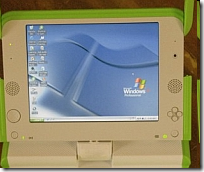
The OLPC (X0) does windows!

Shocking news from New York Times is that the passionately open-source team behind the hundred dollar laptop have done a deal with Microsoft, so that the X0 laptop can run Windows as well as Linux.

After-shocks are flowing throughout the community, with several leading OLPC developers resigning and much angst being aired in the blogospere - as well as some misleading "microsoft buys OLPC" headlines. image

So what really happened?

OLPC has agreed to make a few modifications, so that the XO has more power, can support larger memory cards, and can therefore run Windows (as well as Linux). Total cost to the punter: around $10 more.

Why is this a big deal?

For Microsoft: Corporate market share.

They are trying very hard to be big in education, to be big in the 3rd world, and to be big on small-devices (pardon the pun). The success of initiatives like OLPC was proving that they were failing in this ambition - but now they are back in with a chance. The big compromise they have made is to accept the OLPC can be "dual boot", supporting Linux/Sugar as well.

For OLPC: Fundamental clash!

Many of the teams working on OLPC were doing it for free, for a passionate belief in Open Source, and the power of the collective mind to solve world problems. They were not in it for the money. This is starkly at odds with Microsoft's image, which is why this news is generating such a lot of fall-out.

And what is likely to happen next?

OLPC has been suffering quite a few pains recently. All the tricky bits of deploying and distributing thousands of devices to hard-to-reach places. There have also been several high-profile splits and departures in the senior teams. At the worst, this news could drive away many of the remaining enthusiasts, leaving a chronically depleted team. At best, this could drive significant new sales, and re-energise OLPC, helping them become more successful.

For a well thought through essay on the OLPC problems, from the inside, see Ivan Krstić's post

The bad news: this calls into question the roots of our belief in the power of open source to solve big problems. Sadly, power and politics always seems to get in the way.

The good news: OLPC wasn't all about software and equipment anyway - it is really all about learning. Using learning-centred technology to support 3rd world kids, and leapfrogging their life chances with education. This hasn't changed ... all that has happened is that their devices have got a bit more powerful (and possibly, expensive)

I say we focus on the learning - and make sure the OLPC keeps its learner centred ethos, regardless of the technologies

Thursday, December 13

Tribal's m-learning resources spread across the UK

We are very pleased to announce that all of our mobile learning tools and resources are being made available to all of the MoLeNET winners!

 banner-header

32 projects, covering nearly 100 FE colleges across England will be sharing the £6m LSC funding. They are trying out a wide range of different approaches to m-learning. Some are about consolidating lessons already learned, and others about pushing new boundaries.


Any learners and tutors across those projects, who want to, will be able to make use of the full suite of Tribal's m-learning tools and resources:

Mobile content: http://www.m-learning.org/products/pocket-pc-learning-resources.htm

Authoring tools: http://www.m-learning.org/products/mylearning-author-for-pocket-pc.htm

mediaBoard: http://www.m-learning.org/products/mediaboard.htm

SMS Quiz:  http://www.m-learning.org/products/sms-quiz-author.htm


We wish them all well, as well as the newly formed "Mentors and Champions" - a group of rapidly-becoming-experts, employed by MoLeNET to support and inspire the different projects, and share best practice. Included in their numbers are:

  • James Clay (Gloucestershire College)
  • Elaine Coates (Learning2Go, Wolverhampton City Council)
  • Jill Purcell  (Learning2Go, Wolverhampton City Council)
  • Nigel Davies
  • Di Dawson
  • Bill Lockitt
  • Ron Mitchell (Tower Hamlets College)
  • Mick Mullane (York Coast College)
  • Lillian Soon
  • David Sugden
  • John Whalley

Good luck mentors!

Thursday, December 6

m-learning authoring: we're in the guardian!

Hey! We got a mention in the guardian!

Tribal CTAD has a long pedigree of supporting adult literacy with new technologies, and its latest authoring environment, MyLearning Author for Pocket PC, aims to make it simple to develop learning content for mobile devices. The software has performed well in recent trials within the FE and adult education sectors.


http://education.guardian.co.uk/link/story/0,,2221069,00.html


We have been beetling away behind the scenes upgrading our authoring tool, in response to very valuable input from key partners across the UK (you know who you are!) and will be releasing a significant upgrade in a couple of days.

If you are a current user, chat to us about upgrading. You will get a range of new features including podcasts, new types of activity, audio integration with most existing content, optional online tracking of progress, as well as some major upgrades to the authoring interface.

If you haven't had a go yet ... you don't know what you are missing! I will post some screen dumps and walkthroughs when we go live.

G

Friday, September 7

Gadget review: Toshiba G900 Protege

The great folks at Toshiba let us get our hands on one of the first production G900's to hit our shores, and we leapt on it eagerly, to see how our resources run on it.

The spec is fantastic, and ought to make it a good choice for learning:
  • Wide, high res screen
  • Windows Mobile 6
  • Thumbprint recognition (and scrolling)
  • One of the fastest processors around
  • Reasonable camera (2 mega pixel - but with a great lens)
  • sleek lines


BUT (and this is a big but), both our devices were increadibly slow.
  • Video playback was slow
  • All apps were slow
  • Browsing the folders was slow
  • Email was slow
  • Even using the phone was slow.

We don't know why, and I have delayed posting this blog for three weeks while we wait to hear back from Toshiba. They took our concerns very seriously and are checking them out in their labs, but as yet I have no answer.

Is the problem Windows Mobile 6? Might be, but other WM6 devices seem OK. And all our earlier OS devices were running way faster ... even with less than half the processing power of the G900!

I will update when I hear back from Uncle Tosh ...

Monday, September 3

5 year olds need mobile, playful ICT instead of laptops!

Teaching ICT to primary aged children using tools designed for office-based adults isn't the best approach.

This is the result of a study recently completed at Stirling University in Scotland, which found that it was far more helpful to get them started with the technologies that fit more naturally into their lives: digital cameras, video cameras, electronic keyboard, barcode scanners and mobile phones.

The TES ran a great article on the study this week (pg 34?), and although the full version is not available on the university website just yet, it is expected shortly.

The Tribal m-learning team have had similar, very positive experiences with Key Stage One children using our resources. We recently visited a primary school in Wolverhampton, part of the Learning2Go initiative, and were bowled over by the inspirational mix of PDA activities, class-based learning, and paper-based worksheets.

Robin C, the class teacher, had used our MyLearning Autoring tool to build text based activities, using words from the Oxford Reading Tree scheme. He them made paper-based worksheets to extend these activities further. The mix of book, PDA, differentiated worksheets and class-interaction was very engaging. even the most hyperactive of his 5-6 year olds was totally absorbed in their task.

Kids with a 2 minute attention span were sitting, engrossed, for a good half-hour!

Robin, we think you and your class rock! Keep up the inspiration!

Thursday, July 12

How to compare PocketPc smartphones?

We end up buying an awful lot of smartphones - many of them PocketPC based. (probably almost 3000 over the last couple of years)

it is always a really messy business, haggling with suppliers to get the best price. And it gets extra complicated trying to compare different devices when network providers are rebranding and renaming what are often, essentially, the same phones.

If this sounds familiar to you, there is a shining beacon of hope: the fantastic xda-developers.com.

If you want to figure out your Blue Angel from your Wizard, have a look at the wiki (at wiki.xda-developers.com). They list all the different models, and the many names they have been given.

This is especially useful because the vast majority of these phones are all made by a single Taiwanese manufacturer, HTC.

The forums (at forum.xda-developers.com) are also great for technical support. spectacularly better than any of the network providers we have used in fact. The best one stop shop for tips on how to upgrade the operating system, or unlock your phone, or even fix that nagging problem you are having.


Thanks guys - the mobile learning world appreciates your advice.

Thursday, January 4

Stop ActiveSync asking about partnerships!

Every now and again I stumble over a small technical solution that makes a big difference to my sanity. Here is an essential one for anybody managing multiple PocketPC devices.

If, like us, you use your PocketPc as a shareable learning device and NOT as businessman's tool you will know the frustration of having to tell ActiveSync NOT to form a lasting friendship with your devices everytime you connect them. This is especially true if all you are doing is uploading files to them.

Well, did you know you can turn this off?

You can configure ActiveSync to always assume you want to be a guest.

The trick is that you need to change a registery setting, but Bob, one of our mobile developers, has kindly created this little utility so you can do it yourself:

You will need to download and open our handy ActiveSync Dialog Tweaker utility

To switch "Guest only" mode on, run this file: active_sync_guest_only.reg

To switch back to "Ask me" mode, run this file: active_sync_guest_ask.reg

You can run both of these files directly, just say Yes when it asks if you want to add the information to the registry.

hope these tips find a use somewhere in the mobile ether!

:)

Smallprint1: any registry settings are changed at your own risk

Smallprint2: Guest only mode will only work if
no partnerships have already been established on the desktop.
If a previous partnership has been established, the ActiveSync UI can be suppressed by clearing the Open ActiveSync when my device connects checkbox in ActiveSync's Connection Settings dialog.

Wednesday, December 13

Pocket PCs: storing them and charging them safely

If you are responsible for managing a whole lot of PDAs, where do you store them? How safe are they? How can you keep them charged up?

We currently own about 300 PDAs, and have had to set up and manage more than that number for other people as well. It makes you very aware of every step of the way, when it comes to setting up the devices, pre-installing good software, and getting them ready to give to learners.

Here are a couple of top tips we have found helpful:


1: storing them safely, and keeping them charged

this was our biggest logistical challenge, and we spent quite a while looking for commercial alternatives, but in the end we did it ourselves

We bought a large, lockable, metal cupboard; drilled air-vents and cable slots in the back; and ran extension leads into the multiple shelves. At first we were worried about too much power drain, but in fact the power drain is really minimal, and the cicuit copes fine with the load.

(thanks to Dom who made it, and Santa who manages it!)

2: installing the same software and settings to multiple devices:

This is ridiculously time consuming, unless you have discovered backing up and restoring to your SD card. Your PocketPC has an integrated backup utility - probably somewhere like Start / Programs / XBackup.
  • First, set up one device with all the settings / themes / contacts you need.
  • Then use the backup software to back up the entire device to an SD Card.
  • Then put the card in a new PDA, and use the same program to restore. This will replace all files and settings with those of the earlier device.
  • (of course, if you have different types of PDA, this may not be advised. It works fine when they are all the same)
We have tried many other software based alternatives, including OTA (over the air) upgrades, but none have yet beaten the SD backup on cost / reliability / speed.

3: Unlocking / upgrading / supporting different PocketPCs
which pocketPC have I got?
The more years pass, the more different brand labels I see on different devices. And the more I struggle to know which is which! But there has been one constant: the fantastic xda-developers.com. If you want to figure out your Blue Angel from your Wizard, have a look at the wiki (at wiki.xda-developers.com). You get the low down on which model is which

And what about support? From our experience, we have NEVER had decent technical support from ANY of the phone companies who have supplied the devices. This is because, very often, the support desk has never even seen the devices. They get made in Taiwan by HTC, and then come straight to you. If you want technical tips you need to rely on the world-wide community. So, for tips on how to upgrade the operating system, or fix a problem you are having try the forums (at forum.xda-developers.com). They are great.

Wednesday, October 11

Put those podcasts to work on your PDA!

I am part of the team creating several different mobile learning tools. We make:
  • mobile content
  • tools to help teachers make their own mobile content
  • platforms to help people use SMS and MMS as educational resources
as well as spending much of our time exploring the pedagogies around mobile learning.

That was a rather long buildup to a very specific bit of news. One of our tools, Mylearning author, creates interactive content for mobile devices. But we never made enough use of audio. Sure we included sound effects and voice overs, but audio was always an extra.

I guess we were still struggling to shake off the prejudices of "e-learning on your PC".

Today, I am very pleased to announce that our author also lets you add in audio files. Not audio plus text, or audio as a background, but pure, podcast-style audio files.

We have had learners recording their own pep-talks, to remind them of things they learned before.

We have had recordings of lessons, or public talks

We have a few online e-learning courses that include podcast summaries.

All of these can now be more easily included into the mix when you make your mobile content.

Cool huh?

With huge thanks to Chris - the man who made our very first flash-based mobile content all those years ago, and who is still working magic in 2006 - this time with audios.

Tuesday, September 12

m-learning in the cleaning sector

We are working with Newham college, running several trials with different work based sectors. We have been getting some great feedback from them, and I have just seen a entertaining little promotional DVD that Newham made showcasing one of the trials with hospital cleaners.

I have uploaded a vastly-compressed version of the video. It is well worth a few minutes of viewing!

If you are interested in getting a higher res copy drop me a comment, and I will point you towards the people who made it.

Feedback from the project thus far looks good. I quote from the project manager:

The experience of the project as it is emerging is that
  1. it is hugely popular with learners
  2. tutors are beginning to trust it to the extent that they are abandoning paper based materials in its favour (assessment)
  3. it is entirely suitable for the small chunks of time tutors have to operate within in the hospital cleaning industry
  4. contextualised and generic sfl and vocational materials have been developed for use at all stages of learning, from engagement through initial assessment, delivery, drill and practice, to practice assessment and preparation for national tests - and this is important so that mlearning can be introduced and continue to be used within the working environment (and as part of a blend of materials).
  5. the specific sectors of the transport and cleaning industries have a clear strategic use for this technology. There is a good fit with national strategies for upskilling staff.
  6. Partners are having no trouble engaging employers - they really see the benefits

Related (possibly!)

Related Posts with Thumbnails