Wednesday, July 16

mobile learning across the commonwealth

The PCF5_logom-learning team were very excited to present our mobile learning work at the Fifth Pan-Commonwealth Forum on Open Learning

This is held every two years, and has grown to become one of the world’s leading conferences on learning and global development - bringing together ministers of education, and practitioners from across the commonwealth.

PCf5


We are asked to present - in 20 minutes - on how our mobile learning  might be used across the 3rd world countries represented. it was all recorded, and streamed on Teachers.TV so as soon as we get a video we will upload and share it.


The event brought together an amazing number of real innovators from across the world. Some of my top items were:

  • Community radio stations, broadcasting learning to kids who couldn't get to school
  • Learning = saving lives (HIV/Aids awareness campaigns)
  • using drama and dance to teach all sorts of other subjects
  • strong drive for more "open and shared" resources

Needless to say, being able to showcase all our mobile learning resources running on the $100 laptop (OLPC) was a huge hit!


If you want to see our presentation, see our Slideshare

Wednesday, June 25

Nokia buys Symbian ... and then gives it away!

symbian_226Nokia has just bought out the rest of the Symbian partners, giving it 100% ownership of the Symbian operating system, which it plans to "give away"!

According to the The Register:

Nokia has bought up the bits of Symbian it didn't already own and is chucking the OS into an open-source foundation along with the S60 UI layer, accompanied by Sony Ericsson and DoCoMo, who are throwing in UIQ and MOAP(S) respectively.

The BBC adds

Nokia, which already owns 48% of the UK-based firm, intends to develop its software to compete with Google's planned Android operating system.

...

The Symbian foundation will bring together Nokia, AT&T, LG, Motorola, NTT Docomo, Samsung, Sony Ericsson, STMicroelectronics, Texas Instruments and Vodafone in collaboration on a new, royalty-free open software platform for mobile phones.

Here on MobLearn we have always been Android fans, as much for the open ethos as for the technology itself, and this news certainly adds an exciting new chapter, especially given the Android delays, and the very solid userbase that Symbian already has in the market.

small "ps": although technically "open", access to the Symbian source code is not free. You need to pay $1500 to be in the foundation. But relative to the costs of having your own OS, this must seem minor.

Geoff (with thanks to James for spotting this)

Tuesday, June 17

m-learning in South Africa

Tribal's m-learning team were invited to Cape Town to talk about innovations in learning technologies in the UK. We were part of a delegation sponsored by the DTI / TVET to build bridges between the UK, and South African education businesses

The event: CCC (a collection of FE colleges specialising in vocational training)zozo

Our message: in innovations in learning went down very well - though with some incredulity as the the budgets spent on individual students in the UK. The local minister of  education was in attendance and spent some time discussing how we might be able to help them.

Some of the slides are on our Slideshare

The mood: bizarre! There has been a swathe of investment in South African Education, though it seems to have passed the FE sector by, so they really struggle to attract and maintain talented staff. Because of this, all sorts of seemingly innocent comments by the UK delegation triggered passionate responses - with many lecturers standing up and asking the speakers for jobs!shop window

The backdrop: South Africa is in a very difficult time at the moment, with foreigners and refugees being beaten, and hounded out of all the poorer areas. I was lucky enough to be invited to several refugee centres, and to spend some time with the fascinating, but seriously concerned Zimbabweans, Malawians, Nigerians and Somalis. We wish them all well, and hope the South Africa remembers it is the Rainbow Nation!

Monday, May 19

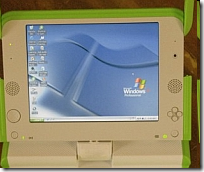
The OLPC (X0) does windows!

Shocking news from New York Times is that the passionately open-source team behind the hundred dollar laptop have done a deal with Microsoft, so that the X0 laptop can run Windows as well as Linux.

After-shocks are flowing throughout the community, with several leading OLPC developers resigning and much angst being aired in the blogospere - as well as some misleading "microsoft buys OLPC" headlines. image
So what really happened?

OLPC has agreed to make a few modifications, so that the XO has more power, can support larger memory cards, and can therefore run Windows (as well as Linux). Total cost to the punter: around $10 more.

Why is this a big deal?

For Microsoft: Corporate market share.

They are trying very hard to be big in education, to be big in the 3rd world, and to be big on small-devices (pardon the pun). The success of initiatives like OLPC was proving that they were failing in this ambition - but now they are back in with a chance. The big compromise they have made is to accept the OLPC can be "dual boot", supporting Linux/Sugar as well.

For OLPC: Fundamental clash!

Many of the teams working on OLPC were doing it for free, for a passionate belief in Open Source, and the power of the collective mind to solve world problems. They were not in it for the money. This is starkly at odds with Microsoft's image, which is why this news is generating such a lot of fall-out.

And what is likely to happen next?

OLPC has been suffering quite a few pains recently. All the tricky bits of deploying and distributing thousands of devices to hard-to-reach places. There have also been several high-profile splits and departures in the senior teams. At the worst, this news could drive away many of the remaining enthusiasts, leaving a chronically depleted team. At best, this could drive significant new sales, and re-energise OLPC, helping them become more successful.

For a well thought through essay on the OLPC problems, from the inside, see Ivan Krstić's post

The bad news: this calls into question the roots of our belief in the power of open source to solve big problems. Sadly, power and politics always seems to get in the way.

The good news: OLPC wasn't all about software and equipment anyway - it is really all about learning. Using learning-centred technology to support 3rd world kids, and leapfrogging their life chances with education. This hasn't changed ... all that has happened is that their devices have got a bit more powerful (and possibly, expensive)

I say we focus on the learning - and make sure the OLPC keeps its learner centred ethos, regardless of the technologies

Wednesday, May 14

m-learning interview ...

Getting started with m-learning?

Interested in what works?

Jo and I were recently interviewed about all the work we have been doing in m-learning, trying to summarise what works, and what doesn't.

If you have 10 minutes to spare, sit back and have a look.


message to the m-veterans:
please send us your comments and thoughts to the blog!

Friday, May 2

OLPC review: is the $100 laptop good enough?

In theory - we all love the One Laptop Per Child initiative (OLPC). But what is it really really like?

We were lucky enough to get one from Seb at ALT-C. There are so many competing views and agendas around this little green machine that we felt the best way to review it would be collaboratively.

the entire Tribal learning technologies team got in on the act, including animators, UI designers, teachers, academics and programmers.

We also enlisted the real experts: our kids! (aged 6, 9 and 11).

So what is it really like?

In super simple summary, we think the OLPC X0-1:

  • is inspirational, embedding good educational ideas and collaboration;
  • solves several big technology challenges;
  • is great fun, but pretty slow;
  • is full of first-generation quirks;
  • has an amazingly rich seam of support info on the OLPC wiki;
  • leads the field in several key directions, but might be superceded quite quickly?

For a more detailed review check out our posting on Fortnightly Mailing

Many of the first generation quirks we spotted seem to be echoed in the justifications for the shock-double-news that the OLPC president is resigning from OLPC, and that future versions may even support Windows OS!!

Shock horror. This is sending even more ripples around the OLPC community than the news that Intel was pulling out last year, and the competing commercial devices (like classmate and eeepc) that are currently hitting the market.

I kind of agree about the quirkiness of the Sugar interface, and that the users experience could be improved ... but the shock waves are greater than this. They are probably because, until now, the Open Source philosophy has been one of the strongest glues that has held all the OLPC developers together, and adoption of Windows as a platform calls that into question.

Watch this space to see what happens....

My vote?
- OLPC will remain all open source, and will keep championing "freedom for users"
- Other, commercial devices will build on what OLPC has created, offering more and more features for less and less money
- whichever way you look, learners win, so long live the OLPC !!!

G

Friday, April 25

Linux "goes large" in Brazilian schools


Brazil has been stealthily growing an amazing sounding project called ProInfo

They are rolling out infrastructure, technology and software to reach 36million students by the end of this year, with more to come!

The software is Linux (KDE desktop), The technology comes as an instant "computer lab", in a couple of different flavours:
  • an inner city one (more seats per single, shared server)
  • a rural one (simpler / lower power usage)
  • a presenting one (one piece of kit with integrated projector, cpu, bundled content and DVD player)
  • an accessible one (huge screen, and extra accessibility devices connected)

I had heard rumours of this, but with no idea of the scale, or the fact that the roll-out includes open content as well.

ProInfo is not about mobility, but a parallel project UCA (One Computer per Student) is. They are about to launch a second phase, buying 150 000 portable machines. Possibly ClassMates, or OLPC.

Wow! The numbers are staggering. The vision bold. The open source world excited. We wait, with baited breath ...

Monday, January 14

$10 million from Google for cool mobile apps

The Android Developer Challenge: Google has offered $10 million to developers for the coolest, most interesting, creative applications that will run on their new mobile operating system.

Android is the google sponsored operating system that they hope will run on all future phones, and with true google flair, they are offering some no-strings-attached funding to encourage developers to get involved.

If you want some of this money, you will need to move fast, though. They have split it into two packages:

Android Developer Challenge I: Happening now. You need to apply before March 3, 2008.

The top 50 entries each get $25K to fund their work, and then they also get the chance to apply for further grants (ten $275K awards and ten $100K awards)

Android Developer Challenge II: This part will only happen once the first android handsets become available - so we are talking the second half of 2008


As always - a breath of fresh air. Lets hope that some of those winning apps are good for learning!

If you want to find out more, visit the android site

Friday, January 4

Intel pulls out of OLPC !!


The news of the week must surely be that Intel, that giant of processors, has pulled out from the One Laptop Per Child project (OLPC).

There is not much information out about why, but it seems like Intel were being pressurised into stopping their own, alternative projects which they were unhappy about. or at least that is how Intel tells it.

Is this significant?

Well, yes, given that Intel dominate the current laptop market, though early versions of XO, the mean, green, OLPC machine were not using an Intel chip anyway, so this may not be a problem in the short term.

Still - it is one step backwards for joint working and co-development.

If you didn't already know, OLPC is the amazing group of people championing super-green, ruggedized, cheap laptops for learning. (See the BBC's technology factfile for the low down)


Geoff2008 (the new improved model)

Thursday, December 13

Tribal's m-learning resources spread across the UK

We are very pleased to announce that all of our mobile learning tools and resources are being made available to all of the MoLeNET winners!

 banner-header

32 projects, covering nearly 100 FE colleges across England will be sharing the £6m LSC funding. They are trying out a wide range of different approaches to m-learning. Some are about consolidating lessons already learned, and others about pushing new boundaries.


Any learners and tutors across those projects, who want to, will be able to make use of the full suite of Tribal's m-learning tools and resources:

Mobile content: http://www.m-learning.org/products/pocket-pc-learning-resources.htm

Authoring tools: http://www.m-learning.org/products/mylearning-author-for-pocket-pc.htm

mediaBoard: http://www.m-learning.org/products/mediaboard.htm

SMS Quiz:  http://www.m-learning.org/products/sms-quiz-author.htm


We wish them all well, as well as the newly formed "Mentors and Champions" - a group of rapidly-becoming-experts, employed by MoLeNET to support and inspire the different projects, and share best practice. Included in their numbers are:

  • James Clay (Gloucestershire College)
  • Elaine Coates (Learning2Go, Wolverhampton City Council)
  • Jill Purcell  (Learning2Go, Wolverhampton City Council)
  • Nigel Davies
  • Di Dawson
  • Bill Lockitt
  • Ron Mitchell (Tower Hamlets College)
  • Mick Mullane (York Coast College)
  • Lillian Soon
  • David Sugden
  • John Whalley

Good luck mentors!

Thursday, December 6

m-learning authoring: we're in the guardian!

Hey! We got a mention in the guardian!

Tribal CTAD has a long pedigree of supporting adult literacy with new technologies, and its latest authoring environment, MyLearning Author for Pocket PC, aims to make it simple to develop learning content for mobile devices. The software has performed well in recent trials within the FE and adult education sectors.


http://education.guardian.co.uk/link/story/0,,2221069,00.html


We have been beetling away behind the scenes upgrading our authoring tool, in response to very valuable input from key partners across the UK (you know who you are!) and will be releasing a significant upgrade in a couple of days.

If you are a current user, chat to us about upgrading. You will get a range of new features including podcasts, new types of activity, audio integration with most existing content, optional online tracking of progress, as well as some major upgrades to the authoring interface.

If you haven't had a go yet ... you don't know what you are missing! I will post some screen dumps and walkthroughs when we go live.

G

Tuesday, November 13

MoLeNET winners go public!


Thanks to the LSN, we have just seen the first, complete list of Colleges and FE Consortia that won slices of the £6m MoLeNET fund.

Congratulations all and good luck with your projects! We look forward to seeing how they turn out

They are:
Aylesbury College Handheld Pathways – mobile applications for the LLDD provision

Bolton Community College EISL Project - Extending, Inspiring and Supporting Learning through the use of Mobile Technologies

Boston College Assessing the impact of m-learning with Work Based Learners undertaking Apprenticeships across Rural Lincolnshire

Bournville College of Further Education M-learning 4 those who care.

Brockenhurst College

brock.mobi - mLog
Cardinal Newman College Teaching & Learning : Technology Driven - Quality Driven
Chichester College

Any time, any place, anywhere.

City of Wolverhampton College Wolverhampton Learning to Go Further!
Cornwall College
Mobile Learning Network across Cornwall

Coulsdon College Mobile learning for literacy (level 1) students

East Berkshire College Mobile Learning at East Berkshire College

Eccles College


Mobile IN Salford

Gateshead College Supporting Science in the Field (SSIF)
Gloucestershire College
Glossy - Mobile Learning in Gloucestershire
Havering Sixth Form College
Using Mobile Technologies in the Classroom, at Home and in the Field to support Minority Teaching Groups (MoLeMINT)

Huddersfield Technical College m4m Project - m-Learning 4 m-People
Kingston College
KAMPUS: Kingston Access to Mobile Personalisation using Ultra-portable Services
Lewisham College
Wireless Blended Learning for Work Based Learners (WBL 4 WBL)
Lowestoft College
Widening participation Through Mobile Learning

Matthew Boulton College of F&HE

m-strategy in Birmingham (msb)
New College Swindon
Mypodcast Developing innovative approaches to personalised learning.
Norwich City College of Further and Higher Education
Harnessing Technology Towards Personalisation (HTTP)
Oaklands College
The MoLeMentors project


Regent College

Improved Learner engagement for 14-19 year olds in the foundation tier and NEET groups using mobile technology


South Thames College

Mobile Inclusion: using mobile technology to fight gang and gun culture
Stockport College
Learning on the Go (LoG) (inc stockport ALS learners)

Stratford-upon-Avon College

MobTec in Action

Tower Hamlets College

Adding m to the mix

Weston College

Wider Weston

Worcester College of Technology

Herefordshire and Worcestershire Vodcasting and Podcasting Consortium

Friday, November 9

NokMote - Wii style interface with your Nokia !!

Here at moblearn we love people who challenge the way we use our technology, and challenge our assumptions about interfaces.

The iPhone / iPod Touch did that for me with its web browsing. Tactile zooming. Automatic rotation.

But did you know some of the same magic is available for Nokia N95?

Like the iPhone, it has an accelerometer inside, but until now it wasn't used for much.

Until, that was, a french programmer called Samir got hold of it ... and produced NokMote. Check out the video - and be sure to watch the end bit, where he uses the phone as a remote control. Amazing!


Thursday, November 8

gPhone anyone?

Finally, some tangible news about the gPhone, or "Google phone"!

It turns out there isn’t going to be a physical device at all, but rather a heavy-weight alliance (the open handset alliance ) who are getting together to create an open source platform for mobile devices.

Loads of big names are involved: Google, HTC, LG, Motorola, Samsung, T-mobile, Intel….

Notable absences: Nokia and Vodafone

The platform is currently called "Android", and if you have ever tried developing software for phones, you will love all the promises that seem custom-made to make battle-weary J2ME and Symbian developers smile once again:

Android does not differentiate between the phone's core applications and third-party applications. They can all be built to have equal access to phone's capabilities


Android is built on the open Linux Kernel


With Android, a developer could build an application that enables users to view the location of their friends and be alerted when they are in the vicinity giving them a chance to connect.

which means I really really can use the phone features

There will be a publicly accessible repository, similar to how the Linux kernel is managed.

which means I can un-install those default apps I don't want

To find out more, look at the Official Google Blog: Where's my Gphone?


Great news all round. Now, lets hold our m-breaths to see if it really can offer what it claims, and if those phone manufacturers really do deliver.


ps: thanks to Bob and Juan who got me onto this

Thursday, October 18

iPod touch - does it have a future for learning?

We love our iPod Touch.


We love that it challenges assumptions on user interface, and takes a few steps towards the hallowed ideal of ubiquitous computing where the interface becomes intuitive (and invisible).

We love that we are not locked into a ridiculous phone contract with Orange for 18 months at £30pm, but we still have all the other features of an iPhone

What we really do NOT love is:

- No flash support. Come on apple, you are using the Safari browser, and an OSX base platform. Why block flash from your browser? (there have been rumours for some time that Flash support will be added but nothing firm)

- No 3rd party apps. I know I know, the hot news of the day is that Apple WILL allow third party developers access, but we will need to wait till next year. In the world of m-learning I am impatient, and want to offer my learners something NOW.

- Mac-only content formats, uploaded via mac-only tools (iTunes). Why not be open?

But life moves fast, and here are some of the growing initiatives that are tying to turn the tide of propriety control over mobile devices:

- MediaMonkey offers a far more flexible alternative to iTunes for synching your media files

- OpenMoko are building an open alternative to smart phone operating systems, as are the MobileAndEmbedded team at Ubuntu


We wait with baited breath for an open iPod Touch ...

Tuesday, October 9

Give up your beard for charity!


Not at all mobile learning related, but I am donating my beard to charity, and wanted to offer any blog readers the chance to see it on it's way!

If you have a beard to donate (or some loose change for a laugh) visit us on www.justgiving.com/giveupyourbeard

The team at www.m-learning.org work for Tribal, and have been included in a company wide "Give it Up" week, which happens next week.

  • We give something up, and raise funds.
  • Tribal doubles the contribution.
  • The money all gets sent to a couple of charities in Africa, in beautiful Botswana and the magical kingdom of Swaziland.
Go on ... you know you want to!

Wednesday, September 19

Handheld learning 07


Tribal is offering a discount code to celebrate the launch of their latest release of authoring tools. Come and visit us on our stand to see them in action.


To get 15% off the entrance price, just make sure you use the code hl07ctad when you register.


Feel free to use it, and to pass it on.


Geoff

Friday, September 7

Gadget review: Toshiba G900 Protege

The great folks at Toshiba let us get our hands on one of the first production G900's to hit our shores, and we leapt on it eagerly, to see how our resources run on it.

The spec is fantastic, and ought to make it a good choice for learning:
  • Wide, high res screen
  • Windows Mobile 6
  • Thumbprint recognition (and scrolling)
  • One of the fastest processors around
  • Reasonable camera (2 mega pixel - but with a great lens)
  • sleek lines


BUT (and this is a big but), both our devices were increadibly slow.
  • Video playback was slow
  • All apps were slow
  • Browsing the folders was slow
  • Email was slow
  • Even using the phone was slow.

We don't know why, and I have delayed posting this blog for three weeks while we wait to hear back from Toshiba. They took our concerns very seriously and are checking them out in their labs, but as yet I have no answer.

Is the problem Windows Mobile 6? Might be, but other WM6 devices seem OK. And all our earlier OS devices were running way faster ... even with less than half the processing power of the G900!

I will update when I hear back from Uncle Tosh ...

Thursday, September 6

m-learning on your iPhone !

It looks like the rumours are true, and we will be using the iPhones for mobile learning by the end of the year!

Apple has just announced the iPod Touch, which is just like a slightly thinner iPhone ... but without the phone.

It has the same touch screen, the same apps, the same Touch OS X operating system, WiFi and a Safari browser.

Apple haven't opened the OS up for us developers to write code for it yet, but access to the browser is a great start and the team at www.m-learning.org are champing at the bit to get their hands on one. Amazon in the US is already listing it

We want our MyLearning Authoring tool to export to as many mobile devices as possible, so even though the attached picture is a simulation, as soon as we can get our hands on one we will post some real samples.

(btw: if you like this, check out our previous postings about PSP where our materials are running within the PSP browser just fine!)

G

ps: thanks to James Clay for spotting this release at midnight last night!

Tuesday, September 4

See you at Alt-C ?


If you are going to be at ALT-C this year, I will be presenting some of our mobile authoring tools on wednesday afternoon at 13:30.

Details of the talk are on the conference site. I will be showcasing some of the great things that our partners and clients have been doing with our authoring tools. Highlights include:

- The Unite project and specifically some great mobile learning activities in the two UK schools

- The ALPs project with Leeds Met University who used the mediaBoard as an e-portfolio

- Some fantastic resources for 5 yr olds made in a Wolverhampton primary school, part of the Learning2Go group

- Work-based skills audits from the transport, catering and customer service industries


I would love to meet some of the blog readers - see you there?

Geoff

Monday, September 3

5 year olds need mobile, playful ICT instead of laptops!

Teaching ICT to primary aged children using tools designed for office-based adults isn't the best approach.

This is the result of a study recently completed at Stirling University in Scotland, which found that it was far more helpful to get them started with the technologies that fit more naturally into their lives: digital cameras, video cameras, electronic keyboard, barcode scanners and mobile phones.

The TES ran a great article on the study this week (pg 34?), and although the full version is not available on the university website just yet, it is expected shortly.

The Tribal m-learning team have had similar, very positive experiences with Key Stage One children using our resources. We recently visited a primary school in Wolverhampton, part of the Learning2Go initiative, and were bowled over by the inspirational mix of PDA activities, class-based learning, and paper-based worksheets.

Robin C, the class teacher, had used our MyLearning Autoring tool to build text based activities, using words from the Oxford Reading Tree scheme. He them made paper-based worksheets to extend these activities further. The mix of book, PDA, differentiated worksheets and class-interaction was very engaging. even the most hyperactive of his 5-6 year olds was totally absorbed in their task.

Kids with a 2 minute attention span were sitting, engrossed, for a good half-hour!

Robin, we think you and your class rock! Keep up the inspiration!

Monday, August 13

How do we keep all our mobile devices charged?

We own and manage a lot of mobile devices. Like between 100 - 1000 depending which ones you count.

Most of them are Windows Mobile, which means they are fairly power hungry, and need regular charging, but with this many devices, how do you safely and securely avoid tripping over cables, and sitting on devices?

Plan 1: is our magical, homemade cupboard. It gets rave reviews by the visitors to our office. If you have ever had to look after multiple devices, you will know why!

Plan 2: A bloke called tony has made a mobile version in a toolbox! I just discovered it on his learninginhand blog.

Another great, lateral thinking plan!


Geoff

Tuesday, August 7

Converting phone video to play on your PC

In the mobile learning world we seem to be forever converting media from one format to another. This is often because phone manufacturers are pushing the envelope in compressing media (especially video), but the PC players are a bit slow to keep up.

This is exactly the time to turn to the Open Source community, and today's post is to point out a few excellent sources of free media conversion.

To play back the file without converting it:

Use VLC media player to play just about any media file.

If you just want to convert the damn file:
Try http://media-convert.com who will convert just about any file to just about any other vaguely relevent format. So upload your phone-video, and get it returned as a wmf or mpeg that will play back nicely from your PC

Alternatively, download super which is ... well ... super at converting most files into most other file formats.

If you are a developer:
Our mediaBoard product needs to support just about any format of media from any phone, and convert it into a web-friendly format, and for this we use the excellent, open source FFmpeg component. If you need to convert your media files, they are well worth checking out.

Thanks to these sites, and the developers behind them for helping out countless of our m-learning users over the years!

G

Thursday, July 12

How to compare PocketPc smartphones?

We end up buying an awful lot of smartphones - many of them PocketPC based. (probably almost 3000 over the last couple of years)

it is always a really messy business, haggling with suppliers to get the best price. And it gets extra complicated trying to compare different devices when network providers are rebranding and renaming what are often, essentially, the same phones.

If this sounds familiar to you, there is a shining beacon of hope: the fantastic xda-developers.com.

If you want to figure out your Blue Angel from your Wizard, have a look at the wiki (at wiki.xda-developers.com). They list all the different models, and the many names they have been given.

This is especially useful because the vast majority of these phones are all made by a single Taiwanese manufacturer, HTC.

The forums (at forum.xda-developers.com) are also great for technical support. spectacularly better than any of the network providers we have used in fact. The best one stop shop for tips on how to upgrade the operating system, or unlock your phone, or even fix that nagging problem you are having.


Thanks guys - the mobile learning world appreciates your advice.

Monday, July 2

Which phones are my students using?

We build applications for all sorts of different phones, and despite the hype, many of the development tools and platforms we use are fairly stable: (MMS, SMS, Flash, Flash Lite, C for PPC etc).

The one technology that we seem to be endlessly tweaking is Java for phones (J2ME), because despite the good-karma that surrounds java's "runs on any device" ethos, the harsh reality is that each phone is different, and J2ME applications need to be tweaked endlessly to deal with new phones.

In fact, we have a huge box full of ex-ebay phones we use for testing.

But how do we know WHICH phones to test on, and which to build for?

It is a bit of a black art, and we rely heavily on our friends (thanks Wolf!) but here are a few useful links:

1. top seller lists are a good start:
http://www.ciao.co.uk/charts.php/ListId/3

2. then, you need to try to get some "install base" lists. This is a lot harder to do, as you need access to some insider knowledge, or very expensive reports. Here is a UK list for jan07:

Nokia

6230i

1,614,900

Samsung

D500

981,660

Motorola

RAZR V3 Black Edition

932,760

Sony Ericsson

K800i

879,900

Nokia

6230

860,470

Sony Ericsson

K750i

792,680

Nokia

6280

781,560

Samsung

D600

774,260

Nokia

3310

769,520

Nokia

1100

744,440


but this still doesn't help you narrow down to your target group. What we do for this group is:

3: We make our own lists. Because we offer free previews of many of our java games, we log all incoming connections against phone types. That way we can spot trends, as well as see new phone-variants we don't support yet and do some preventative development!

here is a sneaky screen dump from one of our games. You can see there are two columns - the red (pre-support) shows the number of downloads we missed out on, and the green (post-support) are the success stories. For total attempts you need to add these together.

Thursday, June 14

6 million pounds to buy m-learning kit in UK


Wow! MoLeNET (www.molenet.org.uk)

Hot off the press - the LSC is making £6million available for FE colleges (and their partners) to buy m-learning devices.

Colleges are being invited to apply for grants of between £100 000 and £500 000 for capital expenses, to contribute to mobile learning projects. Colleges will need to contribute other costs, like training and support to a minimum of 20% of the funding they recieve.

This is great news, as it is a clear indication that the mainstream has recognised the potential benefits in mobile learning, and is trying to spread the love

If you are in FE and based in England, come along to the open day on 9 July

keepin' it mobile

Geoff

Monday, June 4

Make a movie on your PSP!


Have any of you PSP people found out about Go! Edit yet?

If you are using PSP's for education, you have no reason not to! It is a free to download that lets you edit video on your PSP.

Add it to the Go!Cam video camera that plugs into the top of it, and you have a seriously mobile and creative video editing tool.

You can get all the lowdown on the Go!Edit site, though a better place to start would be to download the instruction manual which has some good screen dumps.

Let us know how you get on (and thanks to our inside sources at Sony UK for the details - you know who you are!)

Wednesday, March 28

TES: the one that got away?

Last week I was rather shocked by an article in the TES (Times Educational Supplement) that seemed to suggest that we shouldn't bother making an effort to support reluctant learners.

As a die-hard techie it is a rare moment that I actually write anything (other than blog postings, of course), but I was enthused enough to send a gobsmacked-type email to the TES Editors.

Shock-horror: they replied! the main editor of the TES wrote back and said:
Thank you for your letter. ...... I'm afraid this leader is one that got away. The TES doesn't support the view that schools and colleges should wash their hands of reluctant students. We are carrying a letter in FE Focus this week making some of the points you raise.
I am not sure if this quite counts as a "simpering apology", but I look forward to reading the letter they publish about it!


For those still reading ... here is what I wrote:


Dear TES

I wasn’t sure whether to laugh or cry when I read your editorial on the use of m-learning in Pembrokeshire. At first I assumed it was an attempt at a joke, though quickly realised it was in fact serious!

Your writer seems to have missed out on 90% of the work that Pembrokeshire College has done, focusing instead on the headline grabbing (albeit rather tired) issues of loaning phones to students, and the text-inspired slang they may chose to write in.

Right now, the UK sits amongst the leading countries in the world when it comes to using innovative and new technologies to enhance learning. Sadly, it tends to only happen in specific pockets around the country, but these pockets are being held up, world wide, as examples of best practice. They are being used to help us all rethink how we are able to deliver learning to the maximum benefit for the widest range of our citizens.

The Pembrokeshire work, which won a Beacon Award, is exemplary in that it deploys the technology appropriately and in conjunction with many other teaching techniques, technologies and practices. The team there were involved in the very first m-learning project in 2003/2004 which is when I was pleased to get to know them.

Would your editorial writer prefer us not to innovate, but rather sit still and wait to be overtaken by others that do?

Working with new media always presents risks, but despite the hype, the issues raised in your editorial have not featured in any of the many projects that we have been involved with over the last few years, spanning several thousands of learners.

For anyone interested in finding out some of the facts, here are a couple of useful websites which also include some of the research reports that describe what is actually happening:


http://www.m-learning.org (specifically the reports, here: http://www.m-learning.org/knowledge-centre/m-learning-research.htm )

http://www.learning2go.org (for some future gazing schools)

http://mlearning.noe-kaleidoscope.org (for a lot of the current academic study)

as well as some very active blogs and community sites:

http://moblearn.blogspot.com

http://www.handheldlearning.co.uk

http://mlearning.edublogs.org

http://andysblackhole.blogspot.com


I hope this helps set the record straight, and keeps the flag of innovation flying


Yours sincerely

Geoff Stead

Ps: I know that several very influential practitioners and innovators are formulating a reply to your article, which I will be signing up to as well.

Tuesday, March 27

How to mix your mobile learning cocktail with some traditional ingredients?

We have been getting a lot of recent interest from mainstream, traditional e-learning providers who are trying to understand how they can add a mobile dimension to what they already have.

This is of course great news, because in my book, "the more formats the better". Why prescribe where and how your learners will access their learning if you don't have to.

I stumbled over an American site today that specialises in creating audio stories, by interviewing customers / employees / managers, editing them and delivering them as podcasts. What especially caught my eye, though, was an excerpt from a presentation they gave, where they summarised the most important things they have learned about creating desireable learning resources.

The most important thing we have learned is that in order to deliver value we must deliver ALL of the following:
  • Compelling content. If the content is not interesting, it well never get used and consumed. (Instructionally sound content is not necessarily compelling or interesting)
  • Multiple mediums and delivery methods. Web, CDs, Podcasting, elearning – all offer value, but nothing works for everyone.
  • Client and user support. The greatest product in the world goes nowhere unless it is promoted, supported and measured properly. This is an area we are still learning about, but we have learned a lot.


This matches pretty much exactly with our finding in www.m-learning.org as well as many other recent projects we have done, and certainly spans well beyond podcasts to embrace PocketPC, Java Games, SMS quizzes and other technologies as well.

And how does this link back to the e-learning service providers I mentioned at the start? Well. to me it helps to put m-learning into a useful context, as well as perhaps challenging the types of learning that are currently in many large, online learning environments.

  • Is the content really compelling? (harder to do than it sounds)
  • What is my learner wants to view the content on their phone. Can they?
  • Are there mobile-ready tutors available to support them?
:-)

Friday, March 23

Is TES losing the thread?

The hot-topic of the day in the UK technology learning community seems to be a collection of articles in today's TES.

The first article refers to the fantastic, award winning work being done in Pembrokeshire College supporting hard to reach learners with various innovative approaches.

The second article, an editorial, seems to use the work to rampage against investing money into innovation and outreach projects, without fully understanding the work that Geoff Elliott and Pembrokeshire college have been doing or the great strides forward they have made.


Geoff, for what it is worth, the rest of the mobile learning community think you have been doing some fantastic work and making real strides forward with your projects.

Please keep it up!

Monday, February 26

Learning english via SMS

The mlearn2006 effect must be contagious. Athabasca University in Canada hosted the conference last year, and this year they are in the news for a pilot project using mobile learning to teach english grammar on their phones.

Excellent news!Students at the Mennonite Centre for Newcomers are testing mobile learning - downloading an English grammar lesson, then answering a series of multiple choice, or true or false questions.

It is a great subject area, because the learners are often very motivated, and there are ways of supporting language learning via all sorts of media, including podcasts, web, email, skype and of course SMS.

In this case they are doing grammar exercises, working both in and out of their learning center.
http://www.cbc.ca/canada/edmonton/story/2007/02/09/text-classes.html

The CBS article has some great learner and tutor quotes:

"You're controlling it, which is so nice," said Tracey Woodburn of Athabasca University. "A lot of people have been telling me, 'Oh, I can do this when I am watching my kid's soccer practice or when I am on the bus coming to school.'"


Student Fadieh Al-Kaloti said cellphone learning works well for her.

"You learn where you are — in the bus or in the train or maybe in the plane," she said.


thanks to Andy for the link

mobile assessment?

We have had a lot of interest from schools and HE recently about using mobile quizzes, and mediaBoards for assessment. In fact, I was taken a bit by surprise by the eagerness of different practitioners to assess learner skills - though in hindsight I guess it makes sense.

Assessing learners and learning with technology is both a complex and a rewarding process.

There are many examples of rather crude multiple choice assessments being used as gauges to measure knowledge and understanding. This basic approach has a valid place, but to deal with some of the higher-level knowledge, understanding and "practical-skills" required by many HE and FE learners it is critical to offer a broader range of tools and methodologies, embracing e-evidence as well as multimedia statements from the learners about what they have achieved.

Here are some examples of partners we have been lucky enough to try these ideas out with:

• Mobile, multimedia evidence: Leeds Metropolitan University is using the mediaBoard to collect and collate pictures, sounds and texts captured by their phones, while working directly with clients.

• Mobile skills assessments: London Foyer association used roaming PDAs configured with our locally installed skills checks to assess the basic skills levels of all residents, across 45 different residences. Each learner logs in, takes a few tests, and logs out. Results were stored locally, and then bulk-uploaded to the online tracking system over the air.

• Text message skills checks: We have rolled out contextualised SMS Quizzes to over 150,000 learners across 20 different industries as an "awareness campaign" to get them back into learning

• Online skills checks and, if needed, detailed (adaptive) skills assessment: We currently provide this service, accompanied by learning resources, to plug skills gaps for several very large UK-based employers. This scale of assessment requires robust, audited and quality reviewed systems of delivery, tracking and security

so - this blog post was mostly an update on where we are at with "mobile assessment", as well as a chance to mention the various partners we have been working with to try it out.

Thanks all!


Wednesday, January 10

psp, TV, mp3, pda, mobile phones: can we REALLY put learning onto them all?

How do we cope with supporting real, valid, mobile learning on a huge range of devices?

The more time I spend surrounded by mobile learners, the more this question comes back to haunt me. We have used many different approaches and devices already, but still the issue is FAR from simple.

There are a wide spectrum of strategies. At one end we have learning that is VERY device specific - exploiting what each device does best. At the other end is data-pushing, where we have some central resources that get intelligently reformatted for multiple different devices.

But which is best?

Evolving standards for data push us towards the data-push area. I can see the same RSS feed on many different devices. My smart content system will reformat a powerpoint to run on many different devices. A lo of energy has been invested in perfecting data-push, but is that really enough for learners?

At the other, device specific end, think about simple mp3 players. All they can do is audio. Nothing else. But they have a really useful place in learning. Why can’t I listen to key lessons, and reminders?

Or think about camera phones. Encouraging learners to collect media samples can be a rich and rewarding addition to their learning.

But data push doesn't even get a look in on either of these examples. And most mobile web standards are irrelevant.

So where should we put our energy?

My personal philosophy on this is that we need to be able to do both. We should rejoice in the standards, and wherever possible support the emerging mobile web and data standards like XHTML, RSS, Wap, XML, CSS etc. But we also need to make the most of the unique features of specific devices. Just because the web browser on my smart phone doesn’t talk to my camera, does that mean I shouldn’t take a picture as part of my learning? Of course not! But I can guarantee that if all the learning is too standards or even browser centric this will be neglected.

So - I go for both. Some materials can be pushed out to multiple devices. But beware of losing the (possibly even richer) learning that happens with device specific features.

Thursday, January 4

Stop ActiveSync asking about partnerships!

Every now and again I stumble over a small technical solution that makes a big difference to my sanity. Here is an essential one for anybody managing multiple PocketPC devices.

If, like us, you use your PocketPc as a shareable learning device and NOT as businessman's tool you will know the frustration of having to tell ActiveSync NOT to form a lasting friendship with your devices everytime you connect them. This is especially true if all you are doing is uploading files to them.

Well, did you know you can turn this off?

You can configure ActiveSync to always assume you want to be a guest.

The trick is that you need to change a registery setting, but Bob, one of our mobile developers, has kindly created this little utility so you can do it yourself:

You will need to download and open our handy ActiveSync Dialog Tweaker utility

To switch "Guest only" mode on, run this file: active_sync_guest_only.reg

To switch back to "Ask me" mode, run this file: active_sync_guest_ask.reg

You can run both of these files directly, just say Yes when it asks if you want to add the information to the registry.

hope these tips find a use somewhere in the mobile ether!

:)

Smallprint1: any registry settings are changed at your own risk

Smallprint2: Guest only mode will only work if
no partnerships have already been established on the desktop.
If a previous partnership has been established, the ActiveSync UI can be suppressed by clearing the Open ActiveSync when my device connects checkbox in ActiveSync's Connection Settings dialog.

Wednesday, December 13

Pocket PCs: storing them and charging them safely

If you are responsible for managing a whole lot of PDAs, where do you store them? How safe are they? How can you keep them charged up?

We currently own about 300 PDAs, and have had to set up and manage more than that number for other people as well. It makes you very aware of every step of the way, when it comes to setting up the devices, pre-installing good software, and getting them ready to give to learners.

Here are a couple of top tips we have found helpful:


1: storing them safely, and keeping them charged

this was our biggest logistical challenge, and we spent quite a while looking for commercial alternatives, but in the end we did it ourselves

We bought a large, lockable, metal cupboard; drilled air-vents and cable slots in the back; and ran extension leads into the multiple shelves. At first we were worried about too much power drain, but in fact the power drain is really minimal, and the cicuit copes fine with the load.

(thanks to Dom who made it, and Santa who manages it!)

2: installing the same software and settings to multiple devices:

This is ridiculously time consuming, unless you have discovered backing up and restoring to your SD card. Your PocketPC has an integrated backup utility - probably somewhere like Start / Programs / XBackup.
  • First, set up one device with all the settings / themes / contacts you need.
  • Then use the backup software to back up the entire device to an SD Card.
  • Then put the card in a new PDA, and use the same program to restore. This will replace all files and settings with those of the earlier device.
  • (of course, if you have different types of PDA, this may not be advised. It works fine when they are all the same)
We have tried many other software based alternatives, including OTA (over the air) upgrades, but none have yet beaten the SD backup on cost / reliability / speed.

3: Unlocking / upgrading / supporting different PocketPCs
which pocketPC have I got?
The more years pass, the more different brand labels I see on different devices. And the more I struggle to know which is which! But there has been one constant: the fantastic xda-developers.com. If you want to figure out your Blue Angel from your Wizard, have a look at the wiki (at wiki.xda-developers.com). You get the low down on which model is which

And what about support? From our experience, we have NEVER had decent technical support from ANY of the phone companies who have supplied the devices. This is because, very often, the support desk has never even seen the devices. They get made in Taiwan by HTC, and then come straight to you. If you want technical tips you need to rely on the world-wide community. So, for tips on how to upgrade the operating system, or fix a problem you are having try the forums (at forum.xda-developers.com). They are great.

Friday, December 8

The mobile web is alive and well ... in Africa!

We know the take up of mobile phones in Africa has been way faster than ever expected:

  • 18 months ago, there were already more mobile than fixed-line phones
  • many more people have access to a mobile phone than a landline one
  • mobile networks are sidestepping official, goverment run chaos
We also know the picture isn't all rosy, as there are still vast areas with no coverage and call charges are still high.

But with that as a background, I saw some great statistics on the BBC website today:

  • The vast majority of international visitors accessing the BBC website from their phones come from Africa!
  • Nigeria = 61%
  • South Africa = 19%
So, there may not be enough broadband and PCs around, but it is reassuring that "web on your phone" is still a really useful technology.

Thanks for the phone friendly website, BBC

Monday, December 4

A Beacon award for mobile learning!

We have had a couple of loyal, enthusiastic user-groups who have been involved with mobile learning from our earliest public trials back in 2003 right through to today.

One of them, Pembrokeshire College on the beautiful west coast of Wales, has just won a Beacon Award for their use of mobile learning.

Congratulations to Geoff Elliot and the team!

They have been doing amazing work, and deserve all the credit coming your way. (Geoff is the guy hiding at the back of the photo taken from the college news page)

For those not yet in the know, Beacon Awards recognise imaginative and innovatory teaching and learning practice. In the case of Pembrokeshire they won the FENC award with recognises the leading work they are doing allowing learners to build their own learning via collaboration and sharing.

The FENC ethos is: "Take, Shape and Share" - and Geoff's team have made that work via mobile learning.

This news is so hot off the press, that at the time of writing, the AoC Beacon site doesn't even have this years winners listed yet!

Friday, December 1

more and more hands are holding handhelds ...

I was puzzled by a flurry of messages on some of my favourite mobile learning forums and email groups triggreed by Epic, a UK-based multimedia company, who were predicting that PDAs were on there way out.

For every set of figures saying sales are waning, others tell us that business for handheld vendors is booming.

As somebody who is sitting in the middle of this debate, it feels VERY much to me like more and more people are using mobile devices for learning. In fact, I know this is true.

Every few weeks I am asked for advice on setting up mobile learning friendly environments. Or to advise on which devices might work for a specific school or college.

2 years ago this hardly ever happened.

We bought 25 Vario2's today for a couple of schools we are supporting.

Lets all just enjoy the flow, and make sure our concepts of learning are fluid enough to embrace multi-device, user-driven, multi-modal, collaborative, mobile learning!

Related (possibly!)

Related Posts with Thumbnails